
Flutter SDK
Salient Features
Low code integration - Start accepting payments with a few easy steps and minimal coding with this offering.
Customizable- Customize aspects such as your company logo/banner, payment methods, mandate tenures as well as themes to give your customers an integrated experience
Choice of Payment Methods- Offer your customers the choice to make payments using Cards, UPI or e- NACH across multiple issuers
Steps to get started with BillDesk
This section will guide you through the steps involved in onboarding with BillDesk and beginning your integration
Step 1: Get your BillDesk credentials
Please reach out to your BillDesk Relationship Manager to raise a request for UAT dashboard access.
On logging into the BillDesk portal, the below 2 values will be displayed:
MID- BillDesk assigned Merchant Id (MID) for the UAT setup. MID is a mandatory parameter in all APIs
Client id and secret key client id & secret key are values unique to your integration and are needed to encrypt and decrypt API requests. This has been explained in detailed in the next section of this document
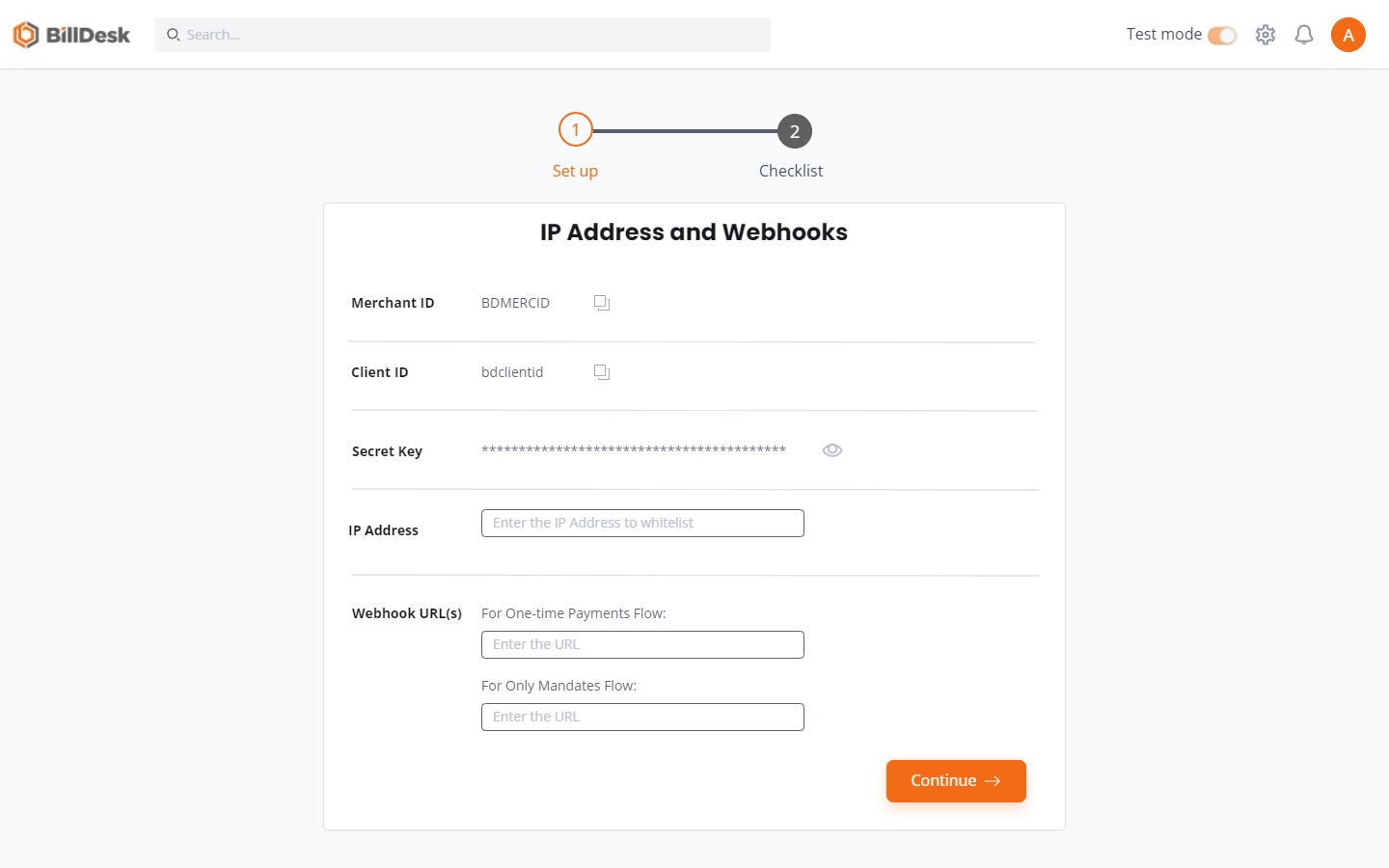
Step 2: Whitelist your IP addresses
All API calls to BillDesk can only be initiated through whitelisted IP addresses (multiple allowed) which are used by your systems. These IP addresses can be whitelisted instantly on the BillDesk UAT portal.
Step 3: Configure the URLs to receive webhooks
Once a customer completes a transaction, this transaction & its status can be received through a webhook URL. BillDesk will POST the response to the end-point provided, which can be used to update the status of the mandate. Webhooks can be configured for the following events:
- Mandate led notifications - Mandate setup status, cancelled mandate, updated mandate etc.
- Pre- Debit led notifications-
- Payment/charge transaction led notifications-
The BillDesk UAT portal allows you to configure these Webhook URLs.
Important Information• The client id and secret key are confidential and must only be shared with authorized personnel
• One one webhook URL can be configured for a particular merchant id
About Recurring Payments
Recurring payments, also known as subscription payments or mandates are transactions charged automatically to the customers card or bank account based on the subscription plan opted for by the customer
Payment methods supporting recurring payments
UPI AutopaySet up recurring payments using customer VPA, in-app redirection or through a UPI QR code
Supported across all leading UPI PSP Apps

CardsCollect recurring payments on leading Credit and Debit Card issuers in India
Supported across all leading domestic card issuers on Rupay, Mastercard, Visa, Diners and Amex networks

e-NACHEnable same-day mandate creation for upto ₹10 Lakhs via e-NACH or e-Mandate. Guarantee faster, superior checkout experience to your customers on Net Banking or Debit Card based authentication.

Mandatory elements for Recurring Payments (Mandates)
There are certain mandatory requirements governing Mandates. BillDesks Hosted Payment page has been built incorporating these guidelines which makes your integration light and seamless without the need to cater to these at your and.
Registration of a Mandate
Every mandate must be authorized by the customer through a one-time process, using additional factor authentication (AFA) prescribed for the payment method opted for. The following are required to be captured in this registration:
- Frequency of Debit
- Amount type- Fixed or Variable
- Amount
- Validity of the Mandate
- Payment Method
Transaction Limits
Mandates for amounts upto INR. 15,000 do not require the customer to authorize the transaction with an additional factor of authentication (AFA)
Mandates for amounts over 15,000 INR need to be authorized by the customer through an AFA each time.
Validity of a Mandate
A mandate can be set for a custom validity depending on the requirement. Only in the case of e-NACH, the maximum time limit for which a mandate can be set is 30 years.
Mandate Lifecycle Management
Once a Mandate has been registered, there are certain mandatory steps required when any subsequent debits towards the mandate, from the payment method opted for have to be made
Intimation of a recurring transactionCustomers must be intimated with a Pre-Debit Notification at least 24 hours before all recurring transactions are effected
Customers must also be given an option to opt out of the recurring transaction
Option to cancel a MandateA customer must be given the option to delete the mandate and opt out of any future recurring payments for the subscribed plan
Our solutions for Recurring Payments
BillDesk's Hosted Payment Page for Recurring Payments has 2 workflows. You can pick a journey most suitable to you and build your integration
One time Payment & Mandate setup
- In this flow, you can take a one time payment from the customer and also register the customer on a Mandate for future recurring transactions
- The mandate will be set on the payment method used by the customer to make the one time payment
- Available payment methods are Card and UPI
Setting up only a Mandate
- In this flow, you can register a customer for a Mandate and setup the future payment plan
- A token amount of INR. 2 is debited from the customer as part of the process and is subsequently refunded
- Available payment methods are Card, UPI and e-NACH
Experience the product
Add video for both here
Steps to Integrate the BillDesk Hosted Payment Page
Depending on the workflows mentioned above, the steps to Integrate vary and have been outlined below
Flow 1: One time Payment & Mandate workflow
Step 1: Creating an Order
An order needs to be created for every transaction initiated using the BillDesk Hosted Payment Page.
To create an order use the Create Order API with the mandate object. The response of this API provides the bdorderId, href & rdata values required to launch the BillDesk Hosted Payment Page (Explained in Step 2)
Attribute | Description |
|---|---|
mercid | Unique identifier provided by BillDesk for each merchant |
href | This is the URL on which the required parameters need to be posted to BillDesk to launch the BillDesk Hosted Payment Page. This value is present in the “links” object in the Create Order API response. Please refer to the response of the Create Order API provided below. The links objects too is available separately. Note: The “links” object contains 2 href parameters. Please use the URL in the second href parameter. |
rdata | Value generated by BillDesk in the “links” object of the Create Order API Please refer to the response of the Create Order API provided below. The links objects too is available separately. |
bdorderid | Value generated by BillDesk in the Create Order API Response |
{
"mercid":"BDMERCID",
"amount":"1500",
"mandate":{
"mercid":"BDMERCID",
"end_date":"2028-11-18",
"amount":"10.00",
"mandate_tokenid":"NN048F17340196",
"subscription_desc":"Subscription Pack 1",
"createdon":"2023-11-18T17:01:09+05:30",
"frequency":"year",
"customer_refid":"CUST1700307069350",
"amount_type":"max",
"debit_day":"6",
"subscription_refid":"SubRef1700307069350",
"currency":"356",
"recurrence_rule":"on",
"start_date":"2023-11-18",
"status":"initiated"
},
"ru":"https://www.merchanturl.com/response.jsp",
"orderid":"BDSDK1700307069350",
"mandate_required":"Y",
"createdon":"2023-11-18T17:01:09+05:30",
"order_date":"2023-11-17T17:01:09+05:30",
"bdorderid":"OAQE2S18EWI1",
"additional_info":{
"additional_info1":"Details1",
"additional_info2":"Details2"
},
"next_step":"redirect",
"itemcode":"DIRECT",
"currency":"356",
"links":[
{
"method":"GET",
"rel":"self",
"href":"https://www.domainname.com/pgi/ve1_2/orders/BDSDK1700307069350"
},
{
"headers":{
"authorization":"OToken 6110e0d6570351bf50fb1e6e47ec254c5672b90d7b7a57c78a47b9bbb3d9e7f7dae821fcaf4bac8a1b4f2c9925d65fd268ba2002cdf31369699775e2a7d945824ce68726eeb54a216021187c221a8ca6f4426e6a83c08ddc8a.70675f7061726"
},
"valid_date":"2023-11-18T17:31:09+05:30",
"method":"POST",
"rel":"redirect",
"href":"https://www.domainname.com/pgi/MerchantPayment/",
"parameters":{
"mercid":"BDMERCID",
"bdorderid":"OAQE2S18EWI1",
"rdata":"89fd934cf8ca5ad76b8efbcf1d56caf8546a28d5b7876ad0f4070d48fa9b6bc00d3d5c85cda042d681d4593a28dd4ecf19b97c4f15eddff452885653e3f08425d35868fc0b05dd1af21d6eec07364e13b9a3b8f4fd56bdc6983fa732a7ab5267c2708da2b41de3edbb05919787dd5f7c52d17b8e9522e0965164100632eda8575a59483f667255b1c4b0f63bb4ef61d.70675f706172616d5f656e6333"
}
}
],
"objectid":"order",
"status":"ACTIVE"
}
{
"links":[
{
"method":"GET",
"rel":"self",
"href":"https://www.domainname.com/pgi/ve1_2/orders/BDSDK1700307069350"
},
{
"headers":{
"authorization":"OToken 6110e0d6570351bf50fb1e6e47ec254c5672b90d7b7a57c78a47b9bbb3d9e7f7dae821fcaf4bac8a1b4f2c9925d65fd268ba2002cdf31369699775e2a7d945824ce68726eeb54a216021187c221a8ca6f4426e6a83c08ddc8a.70675f7061726"
},
"valid_date":"2023-11-18T17:31:09+05:30",
"method":"POST",
"rel":"redirect",
"href":"https://www.domainname.com/pgi/MerchantPayment/",
"parameters":{
"mercid":"BDMERCID",
"bdorderid":"OAQE2S18EWI1",
"rdata":"89fd934cf8ca5ad76b8efbcf1d56caf8546a28d5b7876ad0f4070d48fa9b6bc00d3d5c85cda042d681d4593a28dd4ecf19b97c4f15eddff452885653e3f08425d35868fc0b05dd1af21d6eec07364e13b9a3b8f4fd56bdc6983fa732a7ab5267c2708da2b41de3edbb05919787dd5f7c52d17b8e9522e0965164100632eda8575a59483f667255b1c4b0f63bb4ef61d.70675f706172616d5f656e6333"
}
}
]
}
Pick and choose your flowThe Create Order API is modular and can have 2 additional services as ad on's:
- Account Validation Service (AVS): - AVS can be used incase you wish to permit the customer to complete the transaction with a pre-defined account. More details on AVS available here
- Split Settlement: Applicable incase you want the the transaction settlements in multiple accounts. More details on Split Settlement are available here
Note: If you would like to implement these flows, please contact your BillDesk Relationship Manager prior to initiating the integration.

Preparing a request payloadEvery API Request needs to encrypted. Similarly the Response of each API is also returned in an encrypted format by BillDesk.
A step by step guide to prepare the request payload, transmit it and capture the response is available here

Validity of an orderEvery order created with the Create Order API is valid for a period of 30 minutes. This would mean that the customer needs to be complete a transaction within this timeframe using a payment method of choice

Step 2: Launching the BillDesk Hosted Payment Page
To launch the page you would need to POST a form with attributes received from the Create Order API (Step 1)
Sample Form
<html>
	<head></head>
	<body>
		<form name="sdklaunch" id="sdklaunch" action="https://www.domainname.com/pgi/MerchantPayment" method="POST">
		<input type="hidden" id="flowType" name="flowType" value="payments" />
		<input type="hidden" id="merchantId" name="merchantId" value="BDMERCID" />
		<input type="hidden" id="bdOrderId" name="bdOrderId" value="OAVS21T9I8QL" />
		<input name="submit" type="submit" value="Complete your Payment" />
		</form>
	</body>
</html>
Step 3: Capturing the transaction response
Once the transaction has been completed by the customer using a payment method of choice, the customer is returned to the "ru" attribute provided in the Create Order API. BillDesk will also POST a response to this URL containing details of the transaction.
Capturing and parsing the transaction response
The transaction response provided depends on the payment method used by the customer. (Samples provided below)
The value after the transaction_response parameter till the next "&" character is the encrypted transaction response which provides more details about the transaction. A step by step guide on how to decrypt the transaction_response parameter is available here
mercid=BDMERCID&terminal_state=Y&orderid=MERCORDERID12&bdcres=a6b80a345f3819b70f445fb9bc1f060f78edfd3bfbff98574b6665a4244f50001992f918e4ee28ad15608dcd.70675f706172616d5f656e6331&transaction_response=eyJhbGciOiJIUzI1NiIsImNsaWVudGlkIjoiYmRobWFjdGVzdCIsImtpZCI6IkhNQUMifQ.eyJtZXJjaWQiOiJCRE1PTklUT1IiLCJ0cmFuc2FjdGlvbl9kYXRlIjoiMjAyMy0xMS0wMVQxODowNjoyMSswNTozMCIsInN1cmNoYXJnZSI6IjAuMDAiLCJwYXltZW50X21ldGhvZF90eXBlIjoidXBpIiwiYW1vdW50IjpiMS4wMCIsInJ1IjoiaHR0cHM6Ly93d3cuYmlsbGRlc2suY29tL3dlYi8iLCJvcmRlcmlkIjoiTUVSQ09SREVSSUQxMiIsInRyYW5zYWN0aW9uX2Vycm9yX3R5cGUiOiJzdWNjZXNzIiwiZGlzY291bnQiOiIwLjAwIiwicGF5bWVudF9jYXRlZ29yeSI6IjEwIiwiYmFua19yZWZfbm8iOiIzMzA1Njg1ODA5MDQiLCJ0cmFuc2FjdGlvbmlkIjoiWklDNTE1MDMzMjYxMDkiLCJ1cGkiOnsidnBhIjoiYXJqdW4ua3VyYW5lQHlibCIsIm1hc2tlZF92cGEiOiJ4eHh4eHhAeWJsIn0sInR4bl9wcm9jZXNzX3R5cGUiOiJxciIsImJhbmtpZCI6IklDNSIsImFkZGl0aW9uYWxfaW5mbyI6eyJhZGRpdGlvbmFsX2luZm83IjoiTkEiLCJhZGRpdGlvbmFsX2luZm82IjoiTkEiLCJhZGRpdGlvbmFsX2luZm85IjoiTkEiLCJhZGRpdGlvbmFsX2luZm84IjoiTkEiLCJhZGRpdGlvbmFsX2luZm8xMCI6Ik5BIiwiYWRkaXRpb25hbF9pbmZvMSI6Ik5BIiwiYWRkaXRpb25hbF9pbmZvMyI6Ik5BIiwiYWRkaXRpb25hbF9pbmZvMiI6Ik5BIiwiYWRkaXRpb25hbF9pbmZvNSI6Ik5BIiwiYWRkaXRpb25hbF9pbmZvNCI6Ik5BIn0sIml0ZW1jb2RlIjoiRElSRUNUIiwidHJhbnNhY3Rpb25fZXJyb3JfY29kZSI6IlRSUzAwMDAiLCJjdXJyZW5jeSI6IjM1NiIsImF1dGhfc3RhdHVzIjoiMDMwMCIsInRyYW5zYWN0aW9uX2Vycm9yX2Rlc2MiOiJUcmFuc2FjdGlvbiBTdWNjZXNzZnVsIiwib2JqZWN0aWQiOiJ0cmFuc2FjdGlvbiIsImNoYXJnZV9hbW91bnQiOiIxLjAwIn0.kcdlqnotIs-W8E8CfT_jcmSjAzoRMC4cMRLDQLqXpF0&return_url=https%3A%2F%2Fwww.merchanturl.com%2Ftransaction_response=eyJhbGciOiJIUzI1NiIsImNsaWVudGlkIjoiYmRobWFjdGVzdCIsImtpZCI6IkhNQUMifQ.eyJzdXJjaGFyZ2UiOiIwLjAwIiwicGF5bWVudF9tZXRob2RfdHlwZSI6ImNhcmQiLCJydSI6Imh0dHBzOi8vd3d3LmJpbGxkZXNrLmNvbS93ZWIvIiwiZGlzY291bnQiOiIwLjAwIiwiZWNpIjoiMDIiLCJwYXltZW50X2NhdGVnb3J5IjoiMDIiLCJiYW5rX3JlZl9ubyI6IlQ5MzY1MCIsInRyYW5zYWN0aW9uaWQiOiJaSE1QMTQ2OTg3NzQ3NCIsInR4bl9wcm9jZXNzX3R5cGUiOiIzZHMiLCJiYW5raWQiOiJITVAiLCJjdXJyZW5jeSI6IjM1NiIsImF1dGhfc3RhdHVzIjoiMDMwMCIsInRyYW5zYWN0aW9uX2Vycm9yX2Rlc2MiOiJUcmFuc2FjdGlvbiBTdWNjZXNzZnVsIiwibWVyY2lkIjoiQkRNT05JVE9SIiwidHJhbnNhY3Rpb25fZGF0ZSI6IjIwMjMtMTAtMTdUMTc6MTA6NDUrMDU6MzAiLCJhbW91bnQiOiIxLjAwIiwib3JkZXJpZCI6IkRSRFI0M2ZnaCIsInRyYW5zYWN0aW9uX2Vycm9yX3R5cGUiOiJzdWNjZXNzIiwiYXV0aGNvZGUiOiJOQSIsImFkZGl0aW9uYWxfaW5mbyI6eyJhZGRpdGlvbmFsX2luZm83IjoiTkEiLCJhZGRpdGlvbmFsX2luZm82IjoiTkEiLCJhZGRpdGlvbmFsX2luZm85IjoiTkEiLCJhZGRpdGlvbmFsX2luZm84IjoiTkEiLCJhZGRpdGlvbmFsX2luZm8xMCI6Ik5BIiwiYWRkaXRpb25hbF9pbmZvMSI6Ik5BIiwiYWRkaXRpb25hbF9pbmZvMyI6Ik5BIiwiYWRkaXRpb25hbF9pbmZvMiI6Ik5BIiwiYWRkaXRpb25hbF9pbmZvNSI6Ik5BIiwiYWRkaXRpb25hbF9pbmZvNCI6Ik5BIn0sIml0ZW1jb2RlIjoiRElSRUNUIiwidHJhbnNhY3Rpb25fZXJyb3JfY29kZSI6IlRSUzAwMDAiLCJvYmplY3RpZCI6InRyYW5zYWN0aW9uIiwiY2FyZCI6eyJjYXJkX2VuZCI6IjExNjQiLCJ0eXBlIjoiQ1JFRElUIiwiaXNzdWVyIjoiWWVzIEJhbmsiLCJtYXNrZWRfdmFsdWUiOiJ4eHh4eHh4eHh4eHgxMTY0IiwibmV0d29yayI6Ik1BU1RFUiJ9LCJjaGFyZ2VfYW1vdW50IjoiMS4wMCJ9.7yAkzMIk7L323twTi1wD0cuvCopgWiSvKGOpVtnKmVItransaction_response=eyJhbGciOiJIUzI1NiIsImNsaWVudGlkIjoiYmRobWFjdGVzdCIsImtpZCI6IkhNQUMifQ.eyJzdXJjaGFyZ2UiOiIwLjAwIiwicGF5bWVudF9tZXRob2RfdHlwZSI6ImNhcmQiLCJydSI6Imh0dHBzOi8vd3d3LmJpbGxkZXNrLmNvbS93ZWIvIiwiZGlzY291bnQiOiIwLjAwIiwiZWNpIjoiMDIiLCJwYXltZW50X2NhdGVnb3J5IjoiMDIiLCJiYW5rX3JlZl9ubyI6IlQ5MzY1MCIsInRyYW5zYWN0aW9uaWQiOiJaSE1QMTQ2OTg3NzQ3NCIsInR4bl9wcm9jZXNzX3R5cGUiOiIzZHMiLCJiYW5raWQiOiJITVAiLCJjdXJyZW5jeSI6IjM1NiIsImF1dGhfc3RhdHVzIjoiMDMwMCIsInRyYW5zYWN0aW9uX2Vycm9yX2Rlc2MiOiJUcmFuc2FjdGlvbiBTdWNjZXNzZnVsIiwibWVyY2lkIjoiQkRNT05JVE9SIiwidHJhbnNhY3Rpb25fZGF0ZSI6IjIwMjMtMTAtMTdUMTc6MTA6NDUrMDU6MzAiLCJhbW91bnQiOiIxLjAwIiwib3JkZXJpZCI6IkRSRFI0M2ZnaCIsInRyYW5zYWN0aW9uX2Vycm9yX3R5cGUiOiJzdWNjZXNzIiwiYXV0aGNvZGUiOiJOQSIsImFkZGl0aW9uYWxfaW5mbyI6eyJhZGRpdGlvbmFsX2luZm83IjoiTkEiLCJhZGRpdGlvbmFsX2luZm82IjoiTkEiLCJhZGRpdGlvbmFsX2luZm85IjoiTkEiLCJhZGRpdGlvbmFsX2luZm84IjoiTkEiLCJhZGRpdGlvbmFsX2luZm8xMCI6Ik5BIiwiYWRkaXRpb25hbF9pbmZvMSI6Ik5BIiwiYWRkaXRpb25hbF9pbmZvMyI6Ik5BIiwiYWRkaXRpb25hbF9pbmZvMiI6Ik5BIiwiYWRkaXRpb25hbF9pbmZvNSI6Ik5BIiwiYWRkaXRpb25hbF9pbmZvNCI6Ik5BIn0sIml0ZW1jb2RlIjoiRElSRUNUIiwidHJhbnNhY3Rpb25fZXJyb3JfY29kZSI6IlRSUzAwMDAiLCJvYmplY3RpZCI6InRyYW5zYWN0aW9uIiwiY2FyZCI6eyJjYXJkX2VuZCI6IjExNjQiLCJ0eXBlIjoiQ1JFRElUIiwiaXNzdWVyIjoiWWVzIEJhbmsiLCJtYXNrZWRfdmFsdWUiOiJ4eHh4eHh4eHh4eHgxMTY0IiwibmV0d29yayI6Ik1BU1RFUiJ9LCJjaGFyZ2VfYW1vdW50IjoiMS4wMCJ9.7yAkzMIk7L323twTi1wD0cuvCopgWiSvKGOpVtnKmVI&orderid=DRDR43fgh{
"objectid":"transaction",
"mercid":"BDMERCID",
"transaction_date":"2020-11-20T13:55:59+05:30",
"surcharge":"2.00",
"payment_method_type":"netbanking",
"amount":"300.00",
"ru":"https://example.com/pgresponse/modal/redirect",
"orderid":"yukkq8hnxcrztea8op24bk",
"transaction_error_type":"success",
"discount":"0.00",
"transactionid":"U1230000041968",
"txn_process_type":"nb",
"bankid":"123",
"additional_info":{
"additional_info1":"Details1",
"additional_info2":"Details2",
"additional_info7":"whatsapp"
},
"itemcode":"DIRECT",
"transaction_error_code":"TRS0000",
"currency":"356",
"auth_status":"0300",
"transaction_error_desc":"Transaction Successful",
"charge_amount":"302.00",
"payment_category":"01"
}Alternately, you can also use the orderid parameter and call the Retrieve Transaction API to query the status of the transaction
Status check
- At this stage, we have completed a transaction and also successfully set-up a mandate using the BillDesk Hosted Payment Page
- The next steps involve usage of BillDesk's APIs directly without the BillDesk Hosted Payment Page
Step 4: Initiating a Recurring transaction
There are 2 steps to initiate a recurring transaction after the mandate has been set up. These need to be completed using 2 APIs provided by BillDesk
a. Sending a Pre- Debit Notification for the transaction
b. Initiating the Transaction
Step | Applicable API | Description |
|---|---|---|
Sending a Pre- Debit Notification for the transaction | This API is used to send a Pre- Debit Notification (PDN) to the customer in the form of an "Invoice" which has all the details of the upcoming recurring transaction. This is Mandatory as per regulatory guidelines. Note:
| |
Initiating the Transaction | This API can be used to Initiate the transaction and debit the customers payment instrument registered for the mandate after completing step 1. |
Transaction/Mandate Lifecycle Management
Once the transaction is completed and a Mandate is set, the below 4 APIs are available to Query a transaction or refund or create a refund
Transaction Status CheckYou can check the status of a transaction at any point using the Retrieve Transaction API
Create RefundYou can initiate a refund for any successful transaction using the Create Refund API
Refund Status CheckYou can check the status of a Refund at any point using the Retrieve Refund API
Invoice status checkYou can check the status of an Invoice (Generated when a Pre- Debit Notification is sent to customers) at any point using the Retrieve Invoice API
Flow 2: Only Mandate Setup Workflow
Step 1: Creating an Mandate token
An mandate token needs to be created for every mandate setup initiated using the BillDesk Hosted Payment Page.
To create a mandate use the Create Mandate Tokens API with the mandate object. The response of this API provides the mandate_tokenid, href & rdata values required to launch the BillDesk Hosted Payment Page (Explained in Step 2)
Attribute | Description |
|---|---|
mercid | Unique identifier provided by BillDesk for each merchant |
href | This is the URL on which the required parameters need to be posted to BillDesk to launch the BillDesk Hosted Payment Page. This value is present in the “links” object in the Create Mandate Token API response. Please refer to the response of the Create Mandate Token API provided below. The links objects too is available separately. Note: The “links” object contains 2 href parameters. Please use the URL in the second href parameter. |
rdata | Value generated by BillDesk in the “links” object of the Create Mandate Token API Please refer to the response of the Create Mandate Token API provided below. The links objects too is available separately. |
mandate_tokenid | Value generated by BillDesk in the Create Mandate Token API Response |
{
"mercid":"BDMERCID",
"end_date":"2028-11-19",
"amount":"10.00",
"ru":"https://www.merchanturl.com/response.jsp",
"mandate_tokenid":"NN107717398002",
"subscription_desc":"Subscription pack",
"createdon":"2023-11-19T13:23:19+05:30",
"frequency":"adho",
"customer_refid":"CUST1700380399174",
"amount_type":"max",
"next_step":"redirect",
"debit_day":"6",
"subscription_refid":"SubRef1700380399174",
"currency":"356",
"recurrence_rule":"on",
{
"links":[
{
"headers":null,
"valid_date":null,
"method":"POST",
"rel":"self",
"href":"https://merchantdomain.com/pgsi/v1_2/mandates/token/initiate",
"parameters":null
},
{
"headers":{
"authorization":"OToken 842F1738CDE912F0B3C4F6A26FBAD140E370E03B0A9108FBD12B11E223F3096BB510334849E7B21BABF9D0492CE2EB573CBB5CAB232DABE6BD32557EE3BBB119F2FE2F057A81796F195FA874EEE2BB9333DA5FC00475E0B767.70675F70617261"
},
"valid_date":"2023-11-19T13:53:19+05:30",
"method":"POST",
"rel":"redirect",
"href":"https://www.domainname.com/pgi/MerchantPayment/",
"parameters":{
"mercid":"BDMERCID",
"mandate_tokenid":"NN107717398002",
"rdata":"89fd934cf8ca5ad76b8efbcf1d56caf8546a28d5b7876ad0f4070d48fa9b6bc00d3d5c85cda042d681d4593a28dd4ecf19b97c4f15eddff452885653e3f08425d35868fc0b05dd1af21d6eec07364e13b9a3b8f4fd56bdc6983fa732a7ab5267c2708da2b41de3edbb05919787dd5f7c52d17b8e9522e0965164100632eda8575a59483f667255b1c4b0f63bb4ef61d.70675f706172616d5f656e6333"
}
}
]
}
{
"links":[
{
"method":"GET",
"rel":"self",
"href":"https://www.domainname.com/pgi/ve1_2/orders/BDSDK1700307069350"
},
{
"headers":{
"authorization":"OToken 6110e0d6570351bf50fb1e6e47ec254c5672b90d7b7a57c78a47b9bbb3d9e7f7dae821fcaf4bac8a1b4f2c9925d65fd268ba2002cdf31369699775e2a7d945824ce68726eeb54a216021187c221a8ca6f4426e6a83c08ddc8a.70675f7061726"
},
"valid_date":"2023-11-18T17:31:09+05:30",
"method":"POST",
"rel":"redirect",
"href":"https://www.domainname.com/pgi/MerchantPayment/",
"parameters":{
"mercid":"BDMERCID",
"bdorderid":"OAQE2S18EWI1",
"rdata":"89fd934cf8ca5ad76b8efbcf1d56caf8546a28d5b7876ad0f4070d48fa9b6bc00d3d5c85cda042d681d4593a28dd4ecf19b97c4f15eddff452885653e3f08425d35868fc0b05dd1af21d6eec07364e13b9a3b8f4fd56bdc6983fa732a7ab5267c2708da2b41de3edbb05919787dd5f7c52d17b8e9522e0965164100632eda8575a59483f667255b1c4b0f63bb4ef61d.70675f706172616d5f656e6333"
}
}
]
}
Pick and choose your flowThe Create Mandate Token API is modular and can have 2 additional services as ad on's:
- Account Validation Service (AVS): - AVS can be used incase you wish to permit the customer to complete the transaction with a pre-defined account. More details on AVS available here
- Split Settlement: Applicable incase you want the the transaction settlements in multiple accounts. More details on Split Settlement are available here
Note: If you would like to implement these flows, please contact your BillDesk Relationship Manager prior to initiating the integration.
Preparing a request payloadEvery API Request needs to encrypted. Similarly the Response of each API is also returned in an encrypted format by BillDesk.
A step by step guide to prepare the request payload, transmit it and capture the response is available here
Validity of a mandate tokenEvery mandate token created with the Create Mandate Tokens API is valid for a period of 30 minutes. This would mean that the customer needs to complete the Mandate Setup within this timeframe using a payment method of choice (UPI, Cards or e-NACH)
Step 2: Launching the BillDesk Hosted Payment Page
To launch the page you would need to POST a form with attributes received from the Create Mandate Token API (Step 1)
Sample Form
<html>
	<head></head>
	<body>
		<form name="sdklaunch" id="sdklaunch" action="https://www.domainname.com/pgi/MerchantPayment" method="POST">
		<input type="hidden" id="merchantId" name="merchantId" value="BDMERCID" />
		<input type="hidden" id="mandateTokenId" name="mandateTokenId" value="TSFFDHWE" />
		<input name="submit" type="submit" value="Complete the Mandate Setup" />
		</form>
	</body>
</html>
Step 3: Capturing the mandate response
Once the mandate setp has been completed by the customer using a payment method of choice, the customer is returned to the "ru" attribute provided in the Create Mandate Token API. BillDesk will also POST a response to this URL containing details of the mandate.
Capturing and parsing the mandate response
The transaction response provided depends on the payment method used by the customer. (Samples provided below)
The value after the transaction_response parameter till the next "&" character is the encrypted transaction response which provides more details about the transaction. A step by step guide on how to decrypt the transaction_response parameter is available here
mercid=BDMERCID&terminal_state=Y&orderid=MERCORDERID12&bdcres=a6b80a345f3819b70f445fb9bc1f060f78edfd3bfbff98574b6665a4244f50001992f918e4ee28ad15608dcd.70675f706172616d5f656e6331&transaction_response=eyJhbGciOiJIUzI1NiIsImNsaWVudGlkIjoiYmRobWFjdGVzdCIsImtpZCI6IkhNQUMifQ.eyJtZXJjaWQiOiJCRE1PTklUT1IiLCJ0cmFuc2FjdGlvbl9kYXRlIjoiMjAyMy0xMS0wMVQxODowNjoyMSswNTozMCIsInN1cmNoYXJnZSI6IjAuMDAiLCJwYXltZW50X21ldGhvZF90eXBlIjoidXBpIiwiYW1vdW50IjpiMS4wMCIsInJ1IjoiaHR0cHM6Ly93d3cuYmlsbGRlc2suY29tL3dlYi8iLCJvcmRlcmlkIjoiTUVSQ09SREVSSUQxMiIsInRyYW5zYWN0aW9uX2Vycm9yX3R5cGUiOiJzdWNjZXNzIiwiZGlzY291bnQiOiIwLjAwIiwicGF5bWVudF9jYXRlZ29yeSI6IjEwIiwiYmFua19yZWZfbm8iOiIzMzA1Njg1ODA5MDQiLCJ0cmFuc2FjdGlvbmlkIjoiWklDNTE1MDMzMjYxMDkiLCJ1cGkiOnsidnBhIjoiYXJqdW4ua3VyYW5lQHlibCIsIm1hc2tlZF92cGEiOiJ4eHh4eHhAeWJsIn0sInR4bl9wcm9jZXNzX3R5cGUiOiJxciIsImJhbmtpZCI6IklDNSIsImFkZGl0aW9uYWxfaW5mbyI6eyJhZGRpdGlvbmFsX2luZm83IjoiTkEiLCJhZGRpdGlvbmFsX2luZm82IjoiTkEiLCJhZGRpdGlvbmFsX2luZm85IjoiTkEiLCJhZGRpdGlvbmFsX2luZm84IjoiTkEiLCJhZGRpdGlvbmFsX2luZm8xMCI6Ik5BIiwiYWRkaXRpb25hbF9pbmZvMSI6Ik5BIiwiYWRkaXRpb25hbF9pbmZvMyI6Ik5BIiwiYWRkaXRpb25hbF9pbmZvMiI6Ik5BIiwiYWRkaXRpb25hbF9pbmZvNSI6Ik5BIiwiYWRkaXRpb25hbF9pbmZvNCI6Ik5BIn0sIml0ZW1jb2RlIjoiRElSRUNUIiwidHJhbnNhY3Rpb25fZXJyb3JfY29kZSI6IlRSUzAwMDAiLCJjdXJyZW5jeSI6IjM1NiIsImF1dGhfc3RhdHVzIjoiMDMwMCIsInRyYW5zYWN0aW9uX2Vycm9yX2Rlc2MiOiJUcmFuc2FjdGlvbiBTdWNjZXNzZnVsIiwib2JqZWN0aWQiOiJ0cmFuc2FjdGlvbiIsImNoYXJnZV9hbW91bnQiOiIxLjAwIn0.kcdlqnotIs-W8E8CfT_jcmSjAzoRMC4cMRLDQLqXpF0&return_url=https%3A%2F%2Fwww.merchanturl.com%2Ftransaction_response=eyJhbGciOiJIUzI1NiIsImNsaWVudGlkIjoiYmRobWFjdGVzdCIsImtpZCI6IkhNQUMifQ.eyJzdXJjaGFyZ2UiOiIwLjAwIiwicGF5bWVudF9tZXRob2RfdHlwZSI6ImNhcmQiLCJydSI6Imh0dHBzOi8vd3d3LmJpbGxkZXNrLmNvbS93ZWIvIiwiZGlzY291bnQiOiIwLjAwIiwiZWNpIjoiMDIiLCJwYXltZW50X2NhdGVnb3J5IjoiMDIiLCJiYW5rX3JlZl9ubyI6IlQ5MzY1MCIsInRyYW5zYWN0aW9uaWQiOiJaSE1QMTQ2OTg3NzQ3NCIsInR4bl9wcm9jZXNzX3R5cGUiOiIzZHMiLCJiYW5raWQiOiJITVAiLCJjdXJyZW5jeSI6IjM1NiIsImF1dGhfc3RhdHVzIjoiMDMwMCIsInRyYW5zYWN0aW9uX2Vycm9yX2Rlc2MiOiJUcmFuc2FjdGlvbiBTdWNjZXNzZnVsIiwibWVyY2lkIjoiQkRNT05JVE9SIiwidHJhbnNhY3Rpb25fZGF0ZSI6IjIwMjMtMTAtMTdUMTc6MTA6NDUrMDU6MzAiLCJhbW91bnQiOiIxLjAwIiwib3JkZXJpZCI6IkRSRFI0M2ZnaCIsInRyYW5zYWN0aW9uX2Vycm9yX3R5cGUiOiJzdWNjZXNzIiwiYXV0aGNvZGUiOiJOQSIsImFkZGl0aW9uYWxfaW5mbyI6eyJhZGRpdGlvbmFsX2luZm83IjoiTkEiLCJhZGRpdGlvbmFsX2luZm82IjoiTkEiLCJhZGRpdGlvbmFsX2luZm85IjoiTkEiLCJhZGRpdGlvbmFsX2luZm84IjoiTkEiLCJhZGRpdGlvbmFsX2luZm8xMCI6Ik5BIiwiYWRkaXRpb25hbF9pbmZvMSI6Ik5BIiwiYWRkaXRpb25hbF9pbmZvMyI6Ik5BIiwiYWRkaXRpb25hbF9pbmZvMiI6Ik5BIiwiYWRkaXRpb25hbF9pbmZvNSI6Ik5BIiwiYWRkaXRpb25hbF9pbmZvNCI6Ik5BIn0sIml0ZW1jb2RlIjoiRElSRUNUIiwidHJhbnNhY3Rpb25fZXJyb3JfY29kZSI6IlRSUzAwMDAiLCJvYmplY3RpZCI6InRyYW5zYWN0aW9uIiwiY2FyZCI6eyJjYXJkX2VuZCI6IjExNjQiLCJ0eXBlIjoiQ1JFRElUIiwiaXNzdWVyIjoiWWVzIEJhbmsiLCJtYXNrZWRfdmFsdWUiOiJ4eHh4eHh4eHh4eHgxMTY0IiwibmV0d29yayI6Ik1BU1RFUiJ9LCJjaGFyZ2VfYW1vdW50IjoiMS4wMCJ9.7yAkzMIk7L323twTi1wD0cuvCopgWiSvKGOpVtnKmVItransaction_response=eyJhbGciOiJIUzI1NiIsImNsaWVudGlkIjoiYmRobWFjdGVzdCIsImtpZCI6IkhNQUMifQ.eyJzdXJjaGFyZ2UiOiIwLjAwIiwicGF5bWVudF9tZXRob2RfdHlwZSI6ImNhcmQiLCJydSI6Imh0dHBzOi8vd3d3LmJpbGxkZXNrLmNvbS93ZWIvIiwiZGlzY291bnQiOiIwLjAwIiwiZWNpIjoiMDIiLCJwYXltZW50X2NhdGVnb3J5IjoiMDIiLCJiYW5rX3JlZl9ubyI6IlQ5MzY1MCIsInRyYW5zYWN0aW9uaWQiOiJaSE1QMTQ2OTg3NzQ3NCIsInR4bl9wcm9jZXNzX3R5cGUiOiIzZHMiLCJiYW5raWQiOiJITVAiLCJjdXJyZW5jeSI6IjM1NiIsImF1dGhfc3RhdHVzIjoiMDMwMCIsInRyYW5zYWN0aW9uX2Vycm9yX2Rlc2MiOiJUcmFuc2FjdGlvbiBTdWNjZXNzZnVsIiwibWVyY2lkIjoiQkRNT05JVE9SIiwidHJhbnNhY3Rpb25fZGF0ZSI6IjIwMjMtMTAtMTdUMTc6MTA6NDUrMDU6MzAiLCJhbW91bnQiOiIxLjAwIiwib3JkZXJpZCI6IkRSRFI0M2ZnaCIsInRyYW5zYWN0aW9uX2Vycm9yX3R5cGUiOiJzdWNjZXNzIiwiYXV0aGNvZGUiOiJOQSIsImFkZGl0aW9uYWxfaW5mbyI6eyJhZGRpdGlvbmFsX2luZm83IjoiTkEiLCJhZGRpdGlvbmFsX2luZm82IjoiTkEiLCJhZGRpdGlvbmFsX2luZm85IjoiTkEiLCJhZGRpdGlvbmFsX2luZm84IjoiTkEiLCJhZGRpdGlvbmFsX2luZm8xMCI6Ik5BIiwiYWRkaXRpb25hbF9pbmZvMSI6Ik5BIiwiYWRkaXRpb25hbF9pbmZvMyI6Ik5BIiwiYWRkaXRpb25hbF9pbmZvMiI6Ik5BIiwiYWRkaXRpb25hbF9pbmZvNSI6Ik5BIiwiYWRkaXRpb25hbF9pbmZvNCI6Ik5BIn0sIml0ZW1jb2RlIjoiRElSRUNUIiwidHJhbnNhY3Rpb25fZXJyb3JfY29kZSI6IlRSUzAwMDAiLCJvYmplY3RpZCI6InRyYW5zYWN0aW9uIiwiY2FyZCI6eyJjYXJkX2VuZCI6IjExNjQiLCJ0eXBlIjoiQ1JFRElUIiwiaXNzdWVyIjoiWWVzIEJhbmsiLCJtYXNrZWRfdmFsdWUiOiJ4eHh4eHh4eHh4eHgxMTY0IiwibmV0d29yayI6Ik1BU1RFUiJ9LCJjaGFyZ2VfYW1vdW50IjoiMS4wMCJ9.7yAkzMIk7L323twTi1wD0cuvCopgWiSvKGOpVtnKmVI&orderid=DRDR43fgh{
"objectid":"transaction",
"mercid":"BDMERCID",
"transaction_date":"2020-11-20T13:55:59+05:30",
"surcharge":"2.00",
"payment_method_type":"netbanking",
"amount":"300.00",
"ru":"https://example.com/pgresponse/modal/redirect",
"orderid":"yukkq8hnxcrztea8op24bk",
"transaction_error_type":"success",
"discount":"0.00",
"transactionid":"U1230000041968",
"txn_process_type":"nb",
"bankid":"123",
"additional_info":{
"additional_info1":"Details1",
"additional_info2":"Details2",
"additional_info7":"whatsapp"
},
"itemcode":"DIRECT",
"transaction_error_code":"TRS0000",
"currency":"356",
"auth_status":"0300",
"transaction_error_desc":"Transaction Successful",
"charge_amount":"302.00",
"payment_category":"01"
}Alternately, you can also use the orderid parameter and call the Retrieve Transaction API to query the status of the transaction
Status check
- At this stage, we have successfully set-up a mandate with using the BillDesk Hosted Payment Page
- The next steps involve usage of BillDesk's APIs directly without the BillDesk Hosted Payment Page
Step 4: Initiating a Recurring transaction
There are 2 steps to initiate a recurring transaction after the mandate has been set up. These need to be completed using 2 APIs provided by BillDesk
a. Sending a Pre- Debit Notification for the transaction
b. Initiating the Transaction
Step | Applicable API | Description |
|---|---|---|
Sending a Pre- Debit Notification for the transaction | This API is used to send a Pre- Debit Notification (PDN) to the customer in the form of an "Invoice" which has all the details of the upcoming recurring transaction. This is Mandatory as per regulatory guidelines. Note:
| |
Initiating the Transaction | This API can be used to Initiate the transaction and debit the customers payment instrument registered for the mandate after completing step 1. |
Transaction/Mandate Lifecycle Management
Once the Mandate setup is successful, the below 4 APIs are available to Query the status of a Mandate /Refund or Create a Refund
Mandate Status CheckCheck the status of an individual mandate at any point using the Retrieve Mandate API
Retrieve mandates created for individual customers or mandates created within a date range (max. 7 days) using the List All Mandates API
Invoice status checkYou can check the status of an Invoice (Generated when a Pre- Debit Notification is sent to customers) at any point using the Retrieve Invoice API
Create RefundYou can initiate a refund for any successful transaction using the Create Refund API
Refund Status CheckYou can check the status of a Refund at any point using the Retrieve Refund API
Modifying a Mandate
Post creation, a mandate can either be modified or deleted. Both these actions require an input/action from the customer and hence this step needs to be completed using the BillDesk Hosted Payments Page by following 3 simple steps
Note: This option can be used for both workflows. That is the One- time Payment & Mandate & Only Mandate Setup workflows
Step 1: Creating an Mandate token
An mandate token needs to be created for every mandate to be modified using the BillDesk Hosted Payment Page.
To create a mandate token use the Update Mandate Token API by passing the relevant action- modify or delete. The response of this API provides the mandate_tokenid, href & rdata values required to launch the BillDesk Hosted Payment Page (Explained in Step 2)
Attribute | Description |
|---|---|
mercid | Unique identifier provided by BillDesk for each merchant |
href | This is the URL on which the required parameters need to be posted to BillDesk to launch the BillDesk Hosted Payment Page. This value is present in the “links” object in the Update Mandate Token API response. Please refer to the response of the Update Mandate Token API provided below. The links objects too is available separately. Note: The “links” object contains 2 href parameters. Please use the URL in the second href parameter. |
rdata | Value generated by BillDesk in the “links” object of the Update Mandate Token API Please refer to the response of the Update Mandate Token API provided below. The links objects too is available separately. |
mandate_tokenid | Value generated by BillDesk in the Update Mandate Token API Response |
{
"mercid":"BDMERCID",
"end_date":"2028-11-19",
"amount":"10.00",
"ru":"https://www.merchanturl.com/response.jsp",
"mandate_tokenid":"NN107717398002",
"subscription_desc":"Subscription pack",
"createdon":"2023-11-19T13:23:19+05:30",
"frequency":"adho",
"customer_refid":"CUST1700380399174",
"amount_type":"max",
"next_step":"redirect",
"debit_day":"6",
"subscription_refid":"SubRef1700380399174",
"currency":"356",
"recurrence_rule":"on",
{
"links":[
{
"headers":null,
"valid_date":null,
"method":"POST",
"rel":"self",
"href":"https://merchantdomain.com/pgsi/v1_2/mandates/token/initiate",
"parameters":null
},
{
"headers":{
"authorization":"OToken 842F1738CDE912F0B3C4F6A26FBAD140E370E03B0A9108FBD12B11E223F3096BB510334849E7B21BABF9D0492CE2EB573CBB5CAB232DABE6BD32557EE3BBB119F2FE2F057A81796F195FA874EEE2BB9333DA5FC00475E0B767.70675F70617261"
},
"valid_date":"2023-11-19T13:53:19+05:30",
"method":"POST",
"rel":"redirect",
"href":"https://www.domainname.com/pgi/MerchantPayment/",
"parameters":{
"mercid":"BDMERCID",
"mandate_tokenid":"NN107717398002",
"rdata":"89fd934cf8ca5ad76b8efbcf1d56caf8546a28d5b7876ad0f4070d48fa9b6bc00d3d5c85cda042d681d4593a28dd4ecf19b97c4f15eddff452885653e3f08425d35868fc0b05dd1af21d6eec07364e13b9a3b8f4fd56bdc6983fa732a7ab5267c2708da2b41de3edbb05919787dd5f7c52d17b8e9522e0965164100632eda8575a59483f667255b1c4b0f63bb4ef61d.70675f706172616d5f656e6333"
}
}
]
}
{
"links":[
{
"method":"GET",
"rel":"self",
"href":"https://www.domainname.com/pgi/ve1_2/orders/BDSDK1700307069350"
},
{
"headers":{
"authorization":"OToken 6110e0d6570351bf50fb1e6e47ec254c5672b90d7b7a57c78a47b9bbb3d9e7f7dae821fcaf4bac8a1b4f2c9925d65fd268ba2002cdf31369699775e2a7d945824ce68726eeb54a216021187c221a8ca6f4426e6a83c08ddc8a.70675f7061726"
},
"valid_date":"2023-11-18T17:31:09+05:30",
"method":"POST",
"rel":"redirect",
"href":"https://www.domainname.com/pgi/MerchantPayment/",
"parameters":{
"mercid":"BDMERCID",
"bdorderid":"OAQE2S18EWI1",
"rdata":"89fd934cf8ca5ad76b8efbcf1d56caf8546a28d5b7876ad0f4070d48fa9b6bc00d3d5c85cda042d681d4593a28dd4ecf19b97c4f15eddff452885653e3f08425d35868fc0b05dd1af21d6eec07364e13b9a3b8f4fd56bdc6983fa732a7ab5267c2708da2b41de3edbb05919787dd5f7c52d17b8e9522e0965164100632eda8575a59483f667255b1c4b0f63bb4ef61d.70675f706172616d5f656e6333"
}
}
]
}Step 2: Launching the BillDesk Hosted Payment Page
To launch the page you would need to POST a form with attributes received from the Create Mandate Token API (Step 1)
Sample Form
<html>
	<head></head>
	<body>
		<form name="sdklaunch" id="sdklaunch" action="https://www.domainname.com/pgi/MerchantPayment" method="POST">
		<input type="hidden" id="merchantId" name="merchantId" value="BDMERCID" />
		<input type="hidden" id="mandateTokenId" name="mandateTokenId" value="TSFFDHWE" />
		<input name="submit" type="submit" value="Modify your Mandate" />
		</form>
	</body>
</html>
Step 3: Capturing the mandate response
Once the mandate setup has been completed by the customer using a payment method of choice, the customer is returned to the "ru" attribute provided in the Update Mandate Token API. BillDesk will also POST a response to this URL containing details of the mandate.
Capturing and parsing the mandate response
The transaction response provided depends on the payment method used by the customer. (Samples provided below)
The value after the transaction_response parameter till the next "&" character is the encrypted transaction response which provides more details about the transaction. A step by step guide on how to decrypt the transaction_response parameter is available here
mercid=BDMERCID&terminal_state=Y&orderid=MERCORDERID12&bdcres=a6b80a345f3819b70f445fb9bc1f060f78edfd3bfbff98574b6665a4244f50001992f918e4ee28ad15608dcd.70675f706172616d5f656e6331&transaction_response=eyJhbGciOiJIUzI1NiIsImNsaWVudGlkIjoiYmRobWFjdGVzdCIsImtpZCI6IkhNQUMifQ.eyJtZXJjaWQiOiJCRE1PTklUT1IiLCJ0cmFuc2FjdGlvbl9kYXRlIjoiMjAyMy0xMS0wMVQxODowNjoyMSswNTozMCIsInN1cmNoYXJnZSI6IjAuMDAiLCJwYXltZW50X21ldGhvZF90eXBlIjoidXBpIiwiYW1vdW50IjpiMS4wMCIsInJ1IjoiaHR0cHM6Ly93d3cuYmlsbGRlc2suY29tL3dlYi8iLCJvcmRlcmlkIjoiTUVSQ09SREVSSUQxMiIsInRyYW5zYWN0aW9uX2Vycm9yX3R5cGUiOiJzdWNjZXNzIiwiZGlzY291bnQiOiIwLjAwIiwicGF5bWVudF9jYXRlZ29yeSI6IjEwIiwiYmFua19yZWZfbm8iOiIzMzA1Njg1ODA5MDQiLCJ0cmFuc2FjdGlvbmlkIjoiWklDNTE1MDMzMjYxMDkiLCJ1cGkiOnsidnBhIjoiYXJqdW4ua3VyYW5lQHlibCIsIm1hc2tlZF92cGEiOiJ4eHh4eHhAeWJsIn0sInR4bl9wcm9jZXNzX3R5cGUiOiJxciIsImJhbmtpZCI6IklDNSIsImFkZGl0aW9uYWxfaW5mbyI6eyJhZGRpdGlvbmFsX2luZm83IjoiTkEiLCJhZGRpdGlvbmFsX2luZm82IjoiTkEiLCJhZGRpdGlvbmFsX2luZm85IjoiTkEiLCJhZGRpdGlvbmFsX2luZm84IjoiTkEiLCJhZGRpdGlvbmFsX2luZm8xMCI6Ik5BIiwiYWRkaXRpb25hbF9pbmZvMSI6Ik5BIiwiYWRkaXRpb25hbF9pbmZvMyI6Ik5BIiwiYWRkaXRpb25hbF9pbmZvMiI6Ik5BIiwiYWRkaXRpb25hbF9pbmZvNSI6Ik5BIiwiYWRkaXRpb25hbF9pbmZvNCI6Ik5BIn0sIml0ZW1jb2RlIjoiRElSRUNUIiwidHJhbnNhY3Rpb25fZXJyb3JfY29kZSI6IlRSUzAwMDAiLCJjdXJyZW5jeSI6IjM1NiIsImF1dGhfc3RhdHVzIjoiMDMwMCIsInRyYW5zYWN0aW9uX2Vycm9yX2Rlc2MiOiJUcmFuc2FjdGlvbiBTdWNjZXNzZnVsIiwib2JqZWN0aWQiOiJ0cmFuc2FjdGlvbiIsImNoYXJnZV9hbW91bnQiOiIxLjAwIn0.kcdlqnotIs-W8E8CfT_jcmSjAzoRMC4cMRLDQLqXpF0&return_url=https%3A%2F%2Fwww.merchanturl.com%2Ftransaction_response=eyJhbGciOiJIUzI1NiIsImNsaWVudGlkIjoiYmRobWFjdGVzdCIsImtpZCI6IkhNQUMifQ.eyJzdXJjaGFyZ2UiOiIwLjAwIiwicGF5bWVudF9tZXRob2RfdHlwZSI6ImNhcmQiLCJydSI6Imh0dHBzOi8vd3d3LmJpbGxkZXNrLmNvbS93ZWIvIiwiZGlzY291bnQiOiIwLjAwIiwiZWNpIjoiMDIiLCJwYXltZW50X2NhdGVnb3J5IjoiMDIiLCJiYW5rX3JlZl9ubyI6IlQ5MzY1MCIsInRyYW5zYWN0aW9uaWQiOiJaSE1QMTQ2OTg3NzQ3NCIsInR4bl9wcm9jZXNzX3R5cGUiOiIzZHMiLCJiYW5raWQiOiJITVAiLCJjdXJyZW5jeSI6IjM1NiIsImF1dGhfc3RhdHVzIjoiMDMwMCIsInRyYW5zYWN0aW9uX2Vycm9yX2Rlc2MiOiJUcmFuc2FjdGlvbiBTdWNjZXNzZnVsIiwibWVyY2lkIjoiQkRNT05JVE9SIiwidHJhbnNhY3Rpb25fZGF0ZSI6IjIwMjMtMTAtMTdUMTc6MTA6NDUrMDU6MzAiLCJhbW91bnQiOiIxLjAwIiwib3JkZXJpZCI6IkRSRFI0M2ZnaCIsInRyYW5zYWN0aW9uX2Vycm9yX3R5cGUiOiJzdWNjZXNzIiwiYXV0aGNvZGUiOiJOQSIsImFkZGl0aW9uYWxfaW5mbyI6eyJhZGRpdGlvbmFsX2luZm83IjoiTkEiLCJhZGRpdGlvbmFsX2luZm82IjoiTkEiLCJhZGRpdGlvbmFsX2luZm85IjoiTkEiLCJhZGRpdGlvbmFsX2luZm84IjoiTkEiLCJhZGRpdGlvbmFsX2luZm8xMCI6Ik5BIiwiYWRkaXRpb25hbF9pbmZvMSI6Ik5BIiwiYWRkaXRpb25hbF9pbmZvMyI6Ik5BIiwiYWRkaXRpb25hbF9pbmZvMiI6Ik5BIiwiYWRkaXRpb25hbF9pbmZvNSI6Ik5BIiwiYWRkaXRpb25hbF9pbmZvNCI6Ik5BIn0sIml0ZW1jb2RlIjoiRElSRUNUIiwidHJhbnNhY3Rpb25fZXJyb3JfY29kZSI6IlRSUzAwMDAiLCJvYmplY3RpZCI6InRyYW5zYWN0aW9uIiwiY2FyZCI6eyJjYXJkX2VuZCI6IjExNjQiLCJ0eXBlIjoiQ1JFRElUIiwiaXNzdWVyIjoiWWVzIEJhbmsiLCJtYXNrZWRfdmFsdWUiOiJ4eHh4eHh4eHh4eHgxMTY0IiwibmV0d29yayI6Ik1BU1RFUiJ9LCJjaGFyZ2VfYW1vdW50IjoiMS4wMCJ9.7yAkzMIk7L323twTi1wD0cuvCopgWiSvKGOpVtnKmVItransaction_response=eyJhbGciOiJIUzI1NiIsImNsaWVudGlkIjoiYmRobWFjdGVzdCIsImtpZCI6IkhNQUMifQ.eyJzdXJjaGFyZ2UiOiIwLjAwIiwicGF5bWVudF9tZXRob2RfdHlwZSI6ImNhcmQiLCJydSI6Imh0dHBzOi8vd3d3LmJpbGxkZXNrLmNvbS93ZWIvIiwiZGlzY291bnQiOiIwLjAwIiwiZWNpIjoiMDIiLCJwYXltZW50X2NhdGVnb3J5IjoiMDIiLCJiYW5rX3JlZl9ubyI6IlQ5MzY1MCIsInRyYW5zYWN0aW9uaWQiOiJaSE1QMTQ2OTg3NzQ3NCIsInR4bl9wcm9jZXNzX3R5cGUiOiIzZHMiLCJiYW5raWQiOiJITVAiLCJjdXJyZW5jeSI6IjM1NiIsImF1dGhfc3RhdHVzIjoiMDMwMCIsInRyYW5zYWN0aW9uX2Vycm9yX2Rlc2MiOiJUcmFuc2FjdGlvbiBTdWNjZXNzZnVsIiwibWVyY2lkIjoiQkRNT05JVE9SIiwidHJhbnNhY3Rpb25fZGF0ZSI6IjIwMjMtMTAtMTdUMTc6MTA6NDUrMDU6MzAiLCJhbW91bnQiOiIxLjAwIiwib3JkZXJpZCI6IkRSRFI0M2ZnaCIsInRyYW5zYWN0aW9uX2Vycm9yX3R5cGUiOiJzdWNjZXNzIiwiYXV0aGNvZGUiOiJOQSIsImFkZGl0aW9uYWxfaW5mbyI6eyJhZGRpdGlvbmFsX2luZm83IjoiTkEiLCJhZGRpdGlvbmFsX2luZm82IjoiTkEiLCJhZGRpdGlvbmFsX2luZm85IjoiTkEiLCJhZGRpdGlvbmFsX2luZm84IjoiTkEiLCJhZGRpdGlvbmFsX2luZm8xMCI6Ik5BIiwiYWRkaXRpb25hbF9pbmZvMSI6Ik5BIiwiYWRkaXRpb25hbF9pbmZvMyI6Ik5BIiwiYWRkaXRpb25hbF9pbmZvMiI6Ik5BIiwiYWRkaXRpb25hbF9pbmZvNSI6Ik5BIiwiYWRkaXRpb25hbF9pbmZvNCI6Ik5BIn0sIml0ZW1jb2RlIjoiRElSRUNUIiwidHJhbnNhY3Rpb25fZXJyb3JfY29kZSI6IlRSUzAwMDAiLCJvYmplY3RpZCI6InRyYW5zYWN0aW9uIiwiY2FyZCI6eyJjYXJkX2VuZCI6IjExNjQiLCJ0eXBlIjoiQ1JFRElUIiwiaXNzdWVyIjoiWWVzIEJhbmsiLCJtYXNrZWRfdmFsdWUiOiJ4eHh4eHh4eHh4eHgxMTY0IiwibmV0d29yayI6Ik1BU1RFUiJ9LCJjaGFyZ2VfYW1vdW50IjoiMS4wMCJ9.7yAkzMIk7L323twTi1wD0cuvCopgWiSvKGOpVtnKmVI&orderid=DRDR43fgh{
"objectid":"transaction",
"mercid":"BDMERCID",
"transaction_date":"2020-11-20T13:55:59+05:30",
"surcharge":"2.00",
"payment_method_type":"netbanking",
"amount":"300.00",
"ru":"https://example.com/pgresponse/modal/redirect",
"orderid":"yukkq8hnxcrztea8op24bk",
"transaction_error_type":"success",
"discount":"0.00",
"transactionid":"U1230000041968",
"txn_process_type":"nb",
"bankid":"123",
"additional_info":{
"additional_info1":"Details1",
"additional_info2":"Details2",
"additional_info7":"whatsapp"
},
"itemcode":"DIRECT",
"transaction_error_code":"TRS0000",
"currency":"356",
"auth_status":"0300",
"transaction_error_desc":"Transaction Successful",
"charge_amount":"302.00",
"payment_category":"01"
}Alternately, you can also use the mandateid parameter and call the Retrieve Mandate API to query the updated status of this mandate
Updated 6 months ago