

Ace – SDK
1. Introduction
Introducing an easy to integrate Javascript SDK with a pre- built UI for recurring payments. The BillDesk Ace – SDK works by displaying the BillDesk Ace – SDK as a modal window within merchant's page giving their end customers a seamless and integrated payments experience. The user interface automatically optimises for the form factor, be it a desktop or mobile device allowing merchant(s) to cater to a wide client base.
2. Salient Features
- Low code integration - Start accepting payments with a few easy steps and minimal coding with this offering
- Customizable - Customize aspects such as merchant's company logo and mandate tenures to give their end customers an integrated experience
- Choice of Payment Methods - Offer the end customers the choice to make payments using Cards, UPI or e- NACH across multiple issuers
3. Experience the Product
To get a first-hand experience of how the Web SDK, BillDesk requests to visit BillDesk's API Playground.
> 🚧 API Playground Experience Ace – SDK
>
4. BillDesk Solutions for Recurring Payments
BillDesk's Ace – SDK has 2 flows for Recurring Payments. Merchant can pick a journey most suitable to them and build their integration.
* In this flow, merchant can take a one time payment from the customer and also register the customer on a Mandate for future recurring transactions.
- The mandate will be set on the payment method used by the customer to make the one time payment.
- Available payment methods are Card and UPI.

* In this flow, merchant can register a customer for a Mandate and setup the future payment plan.
- A token amount of ₹. 2 is debited from the customer as part of the process and is subsequently refunded.
- Available payment methods are Card, UPI and e-NACH.

5. Integration Steps
Depending on the workflows mentioned above, the steps to integrate vary and have been outlined below:
Flow 1: One time Payment & Mandate workflow
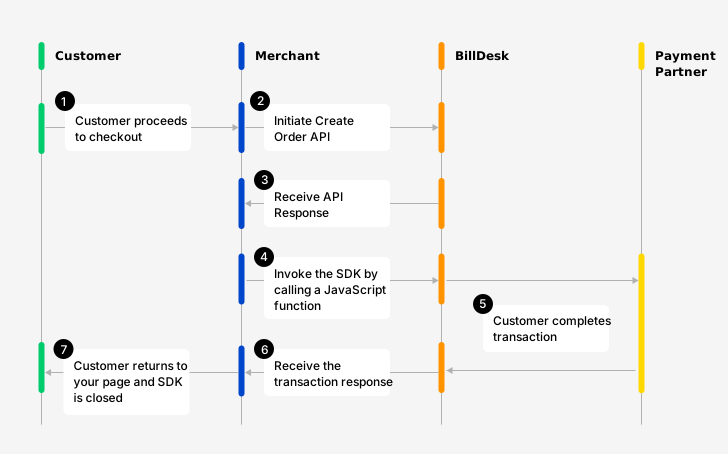
Flow diagram explaining this workflow
Prerequisites
Configure frame-src https://api.billdesk.com in your website's Content Security Policy (CSP) HTTP header to allow iframes from BillDesk.
Step 1: Create an Order
An order needs to be created for every transaction initiated using the BillDesk Ace – SDK.
To create an order, use the Create Order API with the mandate object. The response of this API provides the bdorderIdand authorization values '(among other attributes) which are required to invoke the BillDesk Ace – SDK (explained in Step 2):
| Attribute | Description |
|---|---|
| mercid | Unique identifier provided by BillDesk for each merchant |
| bdorderid | Value generated by BillDesk and provided in the Create Order API Response. This value is unique for every order which is created |
| authorization | An authorization token created by BillDesk and provided in the Create Order API response. This value is unique for every order which is created |
{
	"mercid": "BDMERCID",
	"amount": "1500",
	"mandate": {
		"mercid": "BDMERCID",
		"end_date": "2028-11-18",
		"amount": "10.00",
		"mandate_tokenid": "NN048F17340196",
		"subscription_desc": "Subscription Pack 1",
		"createdon": "2023-11-18T17:01:09+05:30",
		"frequency": "year",
		"customer_refid": "CUST1700307069350",
		"amount_type": "max",
		"debit_day": "1",
		"subscription_refid": "SubRef1700307069350",
		"currency": "356",
		"recurrence_rule": "after",
		"start_date": "2023-11-18",
		"status": "initiated"
	},
	"ru": "https://www.merchanturl.com/response.jsp",
	"orderid": "BDSDK1700307069350",
	"mandate_required": "Y",
	"createdon": "2023-11-18T17:01:09+05:30",
	"order_date": "2023-11-17T17:01:09+05:30",
	"bdorderid": "OAQE2S18EWI1",
	"additional_info": {
		"additional_info1": "Details1",
		"additional_info2": "Details2"
	},
	"next_step": "redirect",
	"itemcode": "DIRECT",
	"currency": "356",
	"links": [
		{
			"method": "GET",
			"rel": "self",
			"href": "https://www.domainname.com/pgi/ve1_2/orders/BDSDK1700307069350"
		},
		{
			"headers": {
				"authorization": "OToken 6110e0d6570351bf50fb1e6e47ec254c5672b90d7b7a57c78a47b9bbb3d9e7f7dae821fcaf4bac8a1b4f2c9925d65fd268ba2002cdf31369699775e2a7d945824ce68726eeb54a216021187c221a8ca6f4426e6a83c08ddc8a.70675f7061726"
			},
			"valid_date": "2023-11-18T17:31:09+05:30",
			"method": "POST",
			"rel": "redirect",
			"href": "https://www.domainname.com/pgi/MerchantPayment/",
			"parameters": {
				"mercid": "BDMERCID",
				"bdorderid": "OAQE2S18EWI1",
				"rdata": "89fd934cf8ca5ad76b8efbcf1d56caf8546a28d5b7876ad0f4070d48fa9b6bc00d3d5c85cda042d681d4593a28dd4ecf19b97c4f15eddff452885653e3f08425d35868fc0b05dd1af21d6eec07364e13b9a3b8f4fd56bdc6983fa732a7ab5267c2708da2b41de3edbb05919787dd5f7c52d17b8e9522e0965164100632eda8575a59483f667255b1c4b0f63bb4ef61d.70675f706172616d5f656e6333"
			}
		}
	],
	"objectid": "order",
	"status": "ACTIVE"
}Every API Request needs to encrypted. Similarly, the Response of each API is also returned in an encrypted format by BillDesk.
A step by step guide to prepare the request payload, transmit it and capture the response is available here.

Every order created with the Create Order API is valid for a period of 30 minutes. This would mean that the customer needs to complete a transaction within this timeframe using a payment method of choice.

Step 2: Incorporate the BillDesk JavaScript link
Please refer below for the BillDesk JavaScript link for both UAT and production environments which needs to be incorporated on merchant's checkout page where the BillDesk Ace – SDK would launch.
<script type="module" src="https://uat1.billdesk.com/merchant-uat/websdk/shared/billdesksdk.esm.js"></script><script type="module" src="https://pay.billdesk.com/websdk/shared/billdesksdk.esm.js"></script>Step 3: Prepare the configuration objects
The flow_config and config are 2 objects which need to be prepared to launch the BillDesk Ace – SDK.
flow_config- The Flow Config is an object which defines how certain aspects of the SDK will render. It contains values received from the Create Order API (Step 1).x`
var flow_config = {
	merchantId: "BDMERCID",
	bdOrderId: "TSFFDHWE",
	authToken: "OToken FDD5C104249A4CDAE734623"
}
var config = {
flowConfig: flow_config,
flowType: "payments"
}Elements in the flow_config object
| Attribute | Description | Classification |
|---|---|---|
| merchantId | Unique identifier provided by BillDesk for each merchant. | mandatory |
| bdOrderid | Value generated by BillDesk and provided in the Create Order API Response. This value is unique for every order which is created. | mandatory |
| authToken | An authorization token created by BillDesk and provided in the Create Order API Response This value is unique for every order which is created. | mandatory |
Note: After completing the transaction on SDK, the encrypted transaction response is provided to the merchant on their return URL (ru) passed in the Create Order API.
Elements in the config object
| Attribute | Description | Classification |
|---|---|---|
| flowConfig | Flow specific configurations | mandatory |
| flowType | Fixed value of "payments" | fixed |
Step 4: Include the function to launch the SDK
The scripts and configuration objects created in the steps above need to be passed to a function to launch the Ace – SDK.
document.addEventListener('DOMContentLoaded', function () {
window.loadBillDeskSdk(config);Step 5: Review your Integration
Based on the steps outlined above, please find below a summary on how merchant integration should look
<script type="module" src="https://uat1.billdesk.com/websdk/shared/billdesksdk.esm.js"></script>
var flow_config = {
merchantId: "BDMERCID",
bdOrderId: "TSFFDHWE",
authToken: "OToken FDD5C104249A4CDAE734623"
}
var config = {
	flowConfig: flow_config,
	flowType: "payments"
}
document.addEventListener('DOMContentLoaded', function () {
             window.loadBillDeskSdk(config);
If you have integrated the Ace - SDK in a WebView in your mobile application, you will need to handle UPI intent.
Step 6: Capture the transaction response
Once the transaction has been completed by the customer using a payment method of choice, the customer is returned to the "ru" attribute provided in the Create Order API. BillDesk will also POST a response to this URL containing details of the transaction.
Capture and parse the transaction response
The transaction response provided depends on the payment method used by the customer. (Samples provided below) :
The value after the transaction_response parameter till the next "&" character is the encrypted transaction response which provides more details about the transaction. A step by step guide on how to decrypt the transaction_response parameter is available here.
Transaction response samples
mercid=BDMERCID&terminal_state=Y&orderid=odfxffdddddr&bdcres=287DF840DBAE93CAB73A5BA1505D33D77099DA8610917D78BAE713FBBAD2C464871E61CA72936A78CBD0E2D2.4145535F55415431&transaction_response=eyJ4NXQjUzI1NiI6IlpqNjdrb3JRMXdjTVAzQlZMWTRZM2N6UzNWVlVaS1c1dzgyTXZpNWNvODQiLCJraWQiOiJiZHNka2RlbW8iLCJhbGciOiJQUzI1NiJ9.ZXlKNE5YUWpVekkxTmlJNklqVlFjRXBTU1hWRWRHeHdkR2xVYUZkcmVUSmFTMnBGU0dkVU5FZGtVbkIzY0RONk4wVnNRa00zV1ZVaUxDSnJhV1FpT2lKaVpITmthMlJsYlc4aUxDSmxibU1pT2lKQk1USTRSME5OSWl3aVlXeG5Jam9pVWxOQkxVOUJSVkF0TWpVMkluMC5rQ2Q2TldsM2kxbEZTRDBMMHNRVXZFU0VQa1BDdzh6dVlSNzQ3ckhwR2MtY1dJVUxoSDBFdWMyaERrSm9JVVNVZThnaGZybTczUGNBdEgwa0JQMWFzNkVnNGd2YmEyUUl0bm12enk1dS0zcXNmSDVmSWhOT05tRE5uVmtiekR1SjRoYlBiejdwRlNpejcwa184d2RodXJCaEJxc2JiUDNSQjJOLVg5MUh5Y0dKYl9mZ3liYjlOWXlWbllra0xZZnhZU01WQWg2cVh1TG54b0ttbWd5bG9FMGoxVm1DWk9JMnJJSG5VNUxlamJZeEtZUWxWNmR2amc4TXU2dXA5S1ItYW0ycjVFV21NNDhWZVhEY3lIZmdNdkVQem1lTTQzZXBvdnoyUzRGUjJkQUgzRG1zbXJYZFpHVFBVX2pZOS1aUnVTcDQ0WDcwaXdzakNlOFhna3J6YVEudXNqN3I2SjZKcXB5UGVmSC42OXdLQU10cVNzcDNGQjI0TzNtY3RhT1hsNFBBSUxSdUhFVnpXUEpKaW04RHFjdlZtdTR4aXl6S25wZDdxd3FuVmJ6QnIwSk80VlRseE9MTnBseks5N3h0R2cxdGJWZ29ncHduanY2TEJLMTNKYVc5Z1ByXzdkM3I2TTlzVG5vODZmX3dqaFhGX0RlOHFHWk9nUVA1b3NfOEp5d0VWY3E5WE9CTnhSVEhYdUZ2WGZlOHExYVlveHdPcS1xUHMtVlhwV2JHZ0dPQVp1OFhjWUN6ZDVTU3FrUVh5LWlENkNyQmluVWF6ekhvbFpTa09sMG1ic1VTTk9xcTdyQXRMb0NMMnhSbWZFSlZxaXFiVEtIQVRnYU00TVFjajFnRzRzeUZvVHAyb1REa3NabHpKUGlTZ0xNOU5sbTlkUEl5TkF6TVFVMVVkLTR0aC1NVjN6N3lDWWFjU0d3VlB2RFhBc2JIWHZJTGlSSV9EOTZqR0xVUTlpa0ZKOU1Fd05mS2htVTJYN3FWcDdtT21nMy16QUVsc3BtUzZ4bENZR1RySmJPRFhPVXdNSENGZE9qSjhiUXZaYndZNENSNEhVbXpiMFdvdklnLU9IWkMtUU9lUzllSGlfdUlLaU0xUnByUEF4SUxBdHhaLU56WnM4Vm04b1lZMndBRUxORDQzMGhfV0hNZlJ4Sll2UkFuZXg4aTBWUGtsSG9qYTJwRzdzM0dJdEtaN01Lc0RvZlMzdXlfLVU1NFdoRTJFaS1XeDY4R0tOREtBekxmRmJZamw1aGtaTzlDT2dfQnBralhSUmRQVjNUMGhXclIwUWt5SFZadTc1Ti1qNDR6d0Y0VUxHWFQ1Y2s0akl1Rkl6a1Badms5NldOS21Od296OEFwMmkweS1DOGhsTG1obm1nSDBnWWR3UFNRc29wVHNNelFKYWtJTjh1RDhhdE8wVERfelZuUGpacEtkemk1M21kM09zcnBZOXFrQkJhcEttbHVndlBOaEEydmxnbE9YZ0ZrS01GVUJoSS1lUERsTlFYMzlqSV9yUGJySkpRZk5zSktQcnJqVlJtSGRVdVVmbmlHMFlXZmN1bkVhbWpzajFzWEo3QVZsRzRJX1JvQlhYanpIeE0wUzNwa0dYQmQzaDltM2hXUVBuWnRQcHY4NnJFSDdyV2NuVjctWHhZeU94UzFDeWxvczJVYmtZR19KLThibmRMRDdKMllLNHpHS0k2bEFuWU15bDF6endybGtrMVZnaElFTzdUSXU0cFEyY2x1djROY1pGVml6X18wdHdoYVJtWC1WRy16U21ianpQOEN3WThzY3RtNHYzclktZFZzOVE4dm9MNFNIbzJqbFZ0SmEtdHRGTjJiSWJXZnA5bFh5WE94SFNoWTRDSnJ5VzlrOV95Zi1tb0xnV1ZZajB0LWhWTnJnRWk5eUZUcTZNbHBRaUs4N0QwdnRlYnloSGZxWDRGTWJnTjRobmw2UU9aUTZiVzUzWUFKLUs3Zmx3WFZoLVVYLXJGTlhPRjc2dUQzNnBLY2p0aVppbVlfX185emxSdk9VMGo0M3h1UEhLakJCc2pIUWk2ZURZMFVoMkdsc1A2UGVFblBwemJiLWxrX080dG5FYl93UzlpSURZMkl5QUw4SUFBemxodTNNNjNaSlk2SGItXzRvT2ExMmYwMG91cTFUN3lSN2s5VnE3dHJaYjNtdGFGZ0dkSUhfZW5reEVKbWFwRlZzZ21zcHM5S3Vzb2liREtKcWF6dGliSk1VQkRGWklWS0N3N29VQ3JSTlk0U2hpOExwczRuZWhUYkM3a21IemZYTExCSExtUVA4M3VIQlQxMThrMWdkNEFVNlBfSXE2OGk4Y1liYUxOVHJaekllS3IxYWRyX00xc3BzZ0dZcnAwTnhKRVNQeXFGYzhNVUtVcW44aEdGRDVxRzdILXFPU1pkdl9DVHBHTlBwUnN0a0JiaWZoZTJnRlg2NnhSc2k5YkVabmRhajVtaEhnWXNDVlRMXzI3dEV6ZVQ0Y2Z2dGJGM2FTTTZfUDVQb2x6MUJtTWdwWUZvcVpFVUZGbmZMX2preURnRFdvYmFBcDhkTWw1ODhzUHQ0NHp0b1dva2lLaUZ1RVBSTDhlYlk2UVlKNTVQZ1Y2OUJtbThrQWlOekVkUFF0QkdHV05lTk9fQnZBNzJzc1hIRlRlaXlCWnN4MUs1b3VuM1ZVMDlGU1hDSnJyeFJlb0FKZ0JqYS1wbGhsdUkxUWduTXFKMHBHcEppSEtLSlZFdXRVa0w3UDJKZGJPbEFJdFA4ZVRRZGZSRXhkcGJnMjdjMFFxbm9xUlpVdlZTWXRUZU5uQ2dfWkViTl95U1JFcGx4RWdTSnpOWnFrWG5RYkxXUmNSWm9qalUxelN5bTRaXzFUb3guNUNxalB0a1RISU9DLTlxVXVobUhsQQ.Fv4Q7sPaV1KoRJyj6CCZqTU338Xxj4OEGSaOCfhZLXAIUgivE04icqybU7va_yHsrf-GMZeSkU1yRWn5b1ia47E_U5N8o_FbnyqHUTH8eSrCGW7NiJgAvqOSMIQZN8tzWNyW-bA4tFwxgqWPa6f6fcEXmeDv3Y88iM1WGYvzrNvi4PDTBt0So5cn9Q73T3BoLYrAl0Pzdw7oB0Iw9ARuYSEYGlQxE_BmGYLakt2x21eBdgouTIsJ-wEX_Bvjva6h3s9Oxuw0S08Y3kfEGtVJpSz0jR5fLENj_-MK8m5bNQpwBoa6Fb6dHISrUk74ZpoT_KM-iTTjiK22vSqg6eZSSA&return_url=https%3A%2F%2Fmerchanturl.com%2Ftransaction_response=eyJ4NXQjUzI1NiI6IlpqNjdrb3JRMXdjTVAzQlZMWTRZM2N6UzNWVlVaS1c1dzgyTXZpNWNvODQiLCJraWQiOiJiZHNka2RlbW8iLCJhbGciOiJQUzI1NiJ9.ZXlKNE5YUWpVekkxTmlJNklqVlFjRXBTU1hWRWRHeHdkR2xVYUZkcmVUSmFTMnBGU0dkVU5FZGtVbkIzY0RONk4wVnNRa00zV1ZVaUxDSnJhV1FpT2lKaVpITmthMlJsYlc4aUxDSmxi1reDJiQzUxbzFzNUpNSmFMRVFRazM4RnA5Q01pZWM0YkVWcjF4dDdfb2hwTkxKRk9JTVFFOXZlWXZjeGRHeU9CRzEzQTVFeW4tZFZaWU41d1ZlNU1oN2tnd3pVdGJGam9haGMtaW1WTVMzck9iVlJBMTV4WU01T0VWWlZWRWNxaDZraXJpV3MxODEyN0FnTEhXR3dqaEc2X0JNVllWY1VUWXhZaUZQVzUxQkk1NmVXVXZtQjRESnBJeGV6WVAwa1k3QkVjZ2wtZnk3anYxcXk4Y29ISVZiTGR6aFhXQ0ZSWWFvdTFOY0xwMjJLdzVOY0VMMHZ2NkI2TnRpSTV1X2Y3VGZwOE5yaFhlRnlpMF9NcGI0LW9hWGxyWlhVcWVuUEVSbzYtbkprT2t2N0N3a2lMdjRWQkFhXzBNZjJwdWl4cjZJd05oQUJicEdDY2hOdVNaenBLMlBqd0dUdEdxRENSVEVVTEQyV1l5cmZ6VXlOYTJ6RGFHeXNndmV4dXVxZXhaTnBNVmVLel95YVA0SjBPMC1MZFdwVUpZWkhraHlxY2Q4c2tHNFNwejZxUjVDdGFtNFZiRUNySG55c3dkS2xwelAtSm5zMUZ3ZkVCWGJmSmVkNWM0ZkJlYjkyMWpuaUFRa0V6TmdjSDVld3NlTjdCZjQ5WTRqZkdqR0dtcEN2aV94ZE5HSWRwQkNiYXZTU056TW1rY005SkhhYnFYNnVFQmRUYWdkNmFVRlM1NHpPWVRSX0FxemJaLUtvXzJkTEZrU2pFS1VldVZ3TWVkU1lCUlJwTjM1WUUteHZreTdXTzNscVAzREtQTnlCOG5OaGFYdjgyMTlIRHh1NktWdkhhcFJjblZ3LU04LXlucGVhRURERG1Icy1aUXhwX2VuR3ZrNlg1VWxUNThkTFVWZW1rLTBBalNsX1Q4b05pb2tUenY4VzdpUC1FMklzYzc2WlhMVUNsM0dZVUc4aElwRkFjQ2U3alNESlJSSHgwbHUwNVFyZW92aUtXQUdZQzhTVmFvUmhqNFJwczl4QU1VeHM4MXBSZ0FpdUFrYzBhU0x4dFRFYkV4aTFLQjFHb2NtSlA1RVZIYlZnUWFYMERDNEdnNVBtM25zTHVtWnV4MmxyMW1NUW45cGUzUldJT1ZyeTlXbFB0ZUJFNVZDUndFZnlHd1g0VkEwaC1vemNQb3BhNG9mUFY3YnBGbnZRUkNQTGJzdTRBWG56blRmZTV2RlpxM0tsQmFuTlYtdDAtc3UwSW5UVWFvbzFXWVVldjlIQy1jM0N4Z2hzRTA5clB6NWtIa0g4UHo3Tk8yZmRUYlBVQkJzNlpibVY1S0gxSHpaSlpYUktRVXU4RHFuUEJFU0RwcGgweFZKeEVEbHU2a25QZlJCV3M0MUZVaVlUVl9FanRVLW5NX1FkYzYtZ010OXpZYUZhZVhscUhIbHhRbGFTWkZ6VjRXSzdMWEdnQldDb0liNmNsYTd5V2R2Q0RETnR2LXdmZHJUc0ZBZnY2ZjhFb3hUUHRhMk5iZlA1VTh6ZVpXb1BQbHJRbFNCUDdyZTZLUldvQWtPb05kM0JTbS1tRDcxTVRhblJJTHVmcVh6TDJDR2hnQ0lnNmN5V1haOG0tUFdGVmNyc2pjdlN4aGttTVpDSnR0S3o3LWNIX3dxM0pzaWhkcnR5RnpNNWlJRXBsR1p4ZHJjNVRkZm42eVV0RktDV25TYVZ2VU0zaWpYWm5PRGtpNTkwV0U2V3VvSnF1UU9mdUlCRmI3aLU5qS2s3TjU4TG5BWmhYMHlEOTR3MlFPQUhxc0RFZGtpMFBNWjQ1a01zQ09yMjBXMW9XQ2hhNkNmOVJjY0FaU2p4NXVCR21Bd3dOMTBjcnhWSDhRNHpaOFlOalVXQy1rOGhsZ2l2U0FRYW52aW9ibGxNNFZENUd4WjJsZWRwYlJvZmtldUt0RWhablRBenlrN0JJV1FmQkUxc3dsdW4xNjVPTl9GMFQtR3hScjQtNjhCeGo0RmxnczllTDc5UEhXdXNNa05Sem9lS0RCeUJXb3IzRjlXVzhnWEVXNmlwaExWRUhybTZEYXl4dmJSQlNyQnhSUXVnWU93SnQxQ0RCMngyeWJEM2ZQbm5xc0hlVVBSaVMya1BWRVBaaHpMMWFRVGVWUTJWb05SeE9kVlVkOEZpYXJuNXM1T0F2QTF5UlEzX3gtMUd1bExKWk84dDlnbF8wMXI3RG5PS1cyaUVxUXlqVDBGckxLTGZUOGNkc0xtTUVSZlVUeWhTQ09MN09WeG9Od3VkMGt3NFFoQloxUF94bHpoeGYyOUJMaW1odV9Ed0FxWWJ5MDdnMUQ2R1JsQ1Fwem1rSjFUWkJzTC1NRXZOY3I5VkMwelVUVjkwTjBMR1dZWUZrbUM3YnJhOEtYSUxyS3l5NXV3SHhtbG1MQkxLUFVzMWgtQjhJU1Y2aHcuSGY1YnpsS0lORFNqQVZlUTdSYXpBQQ.eDhuDhBrt5ES-ZWXj6431-99GE93Da3jC9ic7vQKxccAD5bwHVzGw7QoHp8M1xrGgwVar_l2B-0vaS8crxnxstotVl-arOdQLJr3K1yVlgp3ENwjWA-IJZqAvjppvXGXl6rQmN2T6iNPgNYQ7O6GiO6_H1eAfrHbyKAWuuoezYVW1hj3T096kFLRsKWUy4__n0vwbklaGO8vuhmuuivYA8rB9l0qpZUOGML_wwTcOP-Rl_NoJvubsUtLN7j68ztVT38Qe-g34XGWH-nyuiGU7YYKTdBhyY5J2Hkg4T0XOVO7wfNgZpS3qlDpgayyesw2VbFJ2sWVpKLg&orderid=odfxffdddddrf{
"objectid":"transaction",
"transactionid":"ZHM31766441345",
"orderid":"BDSDK170850189345",
"mercid":"BDMERCID",
"transaction_date":"2024-02-21T13:23:17+05:30",
"amount":"1.79",
"surcharge":"0.00",
"discount":"0.00",
"charge_amount":"1.79",
"currency":"356",
"additional_info":{
"additional_info1":"Details1",
"additional_info2":"Details2",
"additional_info3":"NA",
"additional_info4":"NA",
"additional_info5":"NA",
"additional_info6":"NA",
"additional_info7":"NA"
},
"ru":"https://merchanturl.com/",
"txn_process_type":"3ds",
"bankid":"HM3",
"itemcode":"DIRECT",
"bank_ref_no":"169056",
"auth_status":"0300",
"transaction_error_code":"TRS0000",
"transaction_error_desc":"Transaction Successful",
"transaction_error_type":"success",
"authcode":"NA",
"eci":"02",
"payment_method_type":"card",
"card":{
"masked_value":"xxxxxxxxxxxxxxxx",
"type":"CREDIT",
"card_end":"xxxx",
"network":"MASTER",
"issuer":"Axis Bank",
"cardaccountid":"CA0C24C5000036721330"
},
"mandate":{
"objectid":"mandate",
"mercid":"BDMERCID",
"customer_refid":"CUST1708501896493",
"subscription_refid":"SubRef1708501896493",
"subscription_desc":"BDSDKTEST",
"amount":"10.00",
"amount_type":"maximum",
"start_date":"2024-02-21",
"end_date":"2029-02-21",
"frequency":"year",
"payment_method_type":"card",
"currency":"356",
"bank_umrn":"X5GSxxZVEc",
"status":"active",
"mandateid":"MN044F156053031",
"recurrence_rule":"on",
"debit_day":"6",
"createdon":"2024-02-21T13:23:19+05:30",
"verification_error_code":"TRS0000",
"verification_error_type":"success",
"verification_error_desc":"Transaction Successful"
},
"payment_category":"02"
}
{
"objectid":"transaction",
"transactionid":"U7890001985639",
"orderid":"odfxffdddddr",
"mercid":"BDMERCID",
"transaction_date":"2024-02-11T23:41:42+05:30",
"amount":"1.00",
"surcharge":"3.00",
"discount":"0.00",
"charge_amount":"4.00",
"currency":"356",
"additional_info":{
    "additional_info1":"Details1",
    "additional_info2":"Details2",
    "additional_info3":"NA",
    "additional_info4":"NA",
    "additional_info5":"NA",
    "additional_info6":"NA",
    "additional_info7":"NA"
},
},
"ru":"https://merchanturl.com/",
"txn_process_type":"collect",
"bankid":"789",
"itemcode":"DIRECT",
"auth_status":"0300",
"transaction_error_code":"TRS0000",
"transaction_error_desc":"Transaction Successful",
"transaction_error_type":"success",
"payment_method_type":"upi",
"mandate":{
"objectid":"mandate",
"mercid":"BDMERCID",
"customer_refid":"cdfudd2fffhm",
"subscription_refid":"S2dufffrj78t",
"subscription_desc":"U2Adhjddvnrnrfftg",
"amount":"50.00",
"amount_type":"maximum",
"start_date":"2024-02-11",
"end_date":"2038-12-04",
"frequency":"year",
"payment_method_type":"upi",
"currency":"356",
"bank_umrn":"MgNc49798uuI5jAeGQcNAZeFfDiJlokK@upi",
"status":"active",
"mandateid":"MA087F00287425",
"recurrence_rule":"on",
"debit_day":"6",
"createdon":"2024-02-11T23:41:42+05:30",
"verification_error_code":"TRS0000",
"verification_error_type":"success",
"verification_error_desc":"Transaction Successful"
},
"upi":{
"vpa":"billdesk@pg",
"masked_vpa":"xxxxxx@pg"
},
"payment_category":"10"
}
Alternately, merchant can also use the orderid parameter and call the Retrieve Transaction API to query the status of the transaction.
Status checkAt this stage, we have completed a transaction and also successfully set-up a mandate using the BillDesk Ace – SDK.
Flow 2: Only Mandate Setup Workflow
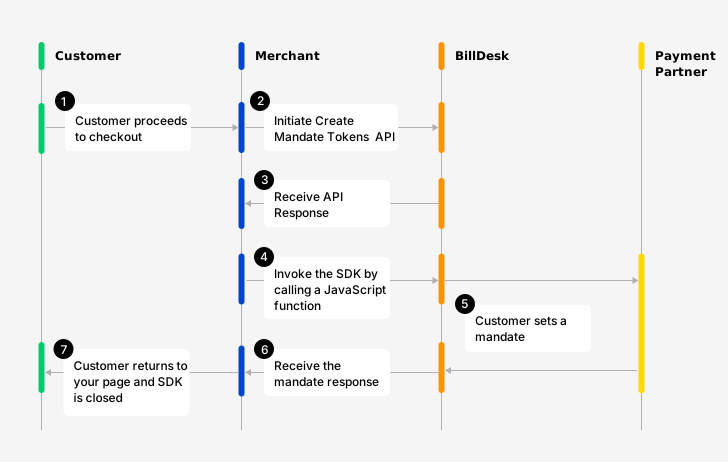
Mandate setup workflow
Prerequisites
Configure frame-src https://api.billdesk.com in your website's Content Security Policy (CSP) HTTP header to allow iframes from BillDesk.
Step 1: Create an Mandate token
A mandate token needs to be created for every mandate setup initiated using the BillDesk Ace – SDK.
To create a mandate, use the Create Mandate Tokens API with the mandate object. The response of this API provides the mandate_tokenid & authorization values (among other attributes) required to launch the BillDesk Ace – SDK (explained Step 2 onwards).
| Attribute | Description |
|---|---|
| mercid | Unique identifier provided by BillDesk for each merchant |
| mandate_tokenid | Value generated by BillDesk and provided in the Create Mandate Tokens API Response. This value is unique for every Mandate token which is created |
| authorization | An authorization token created by BillDesk and provided in the Create Mandate Tokens API Response This value is unique for every Mandate token which is created |
{
	"mercid": "BDMERCID",
	"end_date": "2028-11-19",
	"amount": "10.00",
	"ru": "https://www.merchanturl.com/response.jsp",
	"mandate_tokenid": "NN107717398002",
	"subscription_desc": "Subscription pack",
	"createdon": "2023-11-19T13:23:19+05:30",
	"frequency": "adho",
	"customer_refid": "CUST1700380399174",
	"amount_type": "max",
	"next_step": "redirect",
	"debit_day": "1",
	"subscription_refid": "SubRef1700380399174",
	"currency": "356",
	"recurrence_rule": "after",
	"links": [
		{
			"headers": null,
			"valid_date": null,
			"method": "POST",
			"rel": "self",
			"href": "https://merchantdomain.com/pgsi/v1_2/mandates/token/initiate",
			"parameters": null
		},
		{
			"headers": {
				"authorization": "OToken 842F1738CDE912F0B3C4F6A26FBAD140E370E03B0A9108FBD12B11E223F3096BB510334849E7B21BABF9D0492CE2EB573CBB5CAB232DABE6BD32557EE3BBB119F2FE2F057A81796F195FA874EEE2BB9333DA5FC00475E0B767.70675F70617261"
			},
			"valid_date": "2023-11-19T13:53:19+05:30",
			"method": "POST",
			"rel": "redirect",
			"href": "https://www.domainname.com/pgi/MerchantPayment/",
			"parameters": {
				"mercid": "BDMERCID",
				"mandate_tokenid": "NN107717398002",
				"rdata": "89fd934cf8ca5ad76b8efbcf1d56caf8546a28d5b7876ad0f4070d48fa9b6bc00d3d5c85cda042d681d4593a28dd4ecf19b97c4f15eddff452885653e3f08425d35868fc0b05dd1af21d6eec07364e13b9a3b8f4fd56bdc6983fa732a7ab5267c2708da2b41de3edbb05919787dd5f7c52d17b8e9522e0965164100632eda8575a59483f667255b1c4b0f63bb4ef61d.70675f706172616d5f656e6333"
			}
		}
	]
}Every API Request needs to encrypted. Similarly, the Response of each API is also returned in an encrypted format by BillDesk.
A step by step guide to prepare the request payload, transmit it and capture the response is available here.

Every mandate token created with the Update Mandate Token API is valid for a period of 30 minutes. This would mean that the customer needs to modify or delete the mandate in this timeframe.

Step 2: Incorporate the BillDesk JavaScript link
Please refer to the below for the BillDesk JavaScript link for both UAT and production environments which needs to be incorporated on merchant's checkout page where the BillDesk Ace – SDK would launch.
<script type="module" src="https://uat1.billdesk.com/websdk/shared/billdesksdk.esm.js"></script><script type="module" src="https://pay.billdesk.com/websdk/v2/shared/billdesksdk.esm.js"></script>Step 3: Prepare the configuration objects
The mandate_flow_config and config are 2 objects which need to be prepared to launch the BillDesk Ace – SDK.
mandate_flow_config- The object which defines how certain aspects of the the SDK will render. It contains values received from the Create Mandate Tokens API (Step 1).
var mandate_flow_config = {
merchantId: "BDMERCID",
mandateTokenId: "TSFFDHWE",
authToken: "OToken FDD5C104249A4CDAE734623"
}
var config = {
flowConfig: mandate_flow_config,
flowType: "emandate"
}Elements in the flow_config object
| Attribute | Description | Classification |
|---|---|---|
| merchantId | Unique identifier provided by BillDesk for each merchant. | mandatory |
| mandateTokenId | Value generated by BillDesk and provided in the Create Mandate Tokens API Response. This value is unique for every Mandate token which is created. | mandatory |
| authToken | An authorization token created by BillDesk and provided in the Create Mandate Tokens API Response This value is unique for every order which is created. | mandatory |
Elements in the config object
| Attribute | Description | Classification |
|---|---|---|
| mandate_flow_config | Flow specific configurations | mandatory |
| flowType | Fixed value of "emandate" | fixed |
Step 4: Include the function to launch the SDK
The scripts and configuration objects created in the steps above need to be passed to a function to launch the Ace – SDK.
document.addEventListener('DOMContentLoaded', function () {
             window.loadBillDeskSdk(config);
Step 5: Review the Integration
Based on the steps proposed above, please find below a summary on how merchant's integration should look.
<script type="module" src="https://uat1.billdesk.com/websdk/shared/billdesksdk.esm.js"></script>

var mandate_flow_config = {
  merchantId: "BDMERCID",
  bdOrderId: "TSFFDHWE",
  authToken: "OToken FDD5C104249A4CDAE734623"
}

var config = {
  mandate_flow_config: mandate_flow_config,
  flowType: "emandate"
}

document.addEventListener('DOMContentLoaded', function () {
             window.loadBillDeskSdk(config);
If you have integrated the Ace - SDK in a WebView in your mobile application, you will need to handle UPI intent.
Step 6: Capture the mandate response
Once the mandate setup has been completed by the customer using a payment method of choice, the customer is returned to the "ru" attribute provided in the Create Mandate Tokens API. BillDesk will also POST a response to this URL containing details of the mandate.
Capture and parse the mandate response
The transaction response provided depends on the payment method used by the customer. (Samples provided below):
The value after the mandate_response parameter till the next "&" character is the encrypted mandate response which provides more details about the mandate which has been set up. A step by step guide on how to decrypt the mandate_response parameter is available here.
Mandate response samples
mercid=BDMERCID&terminal_state=Y&mandate_tokenid=MERCORDERID12&bdcres=a6b80a345f3819b70f445fb9bc1f060f78edfd3bfbff98574b6665a4244f50001992f918e4ee28ad15608dcd.70675f706172616d5f656e6331&mandate_response=eyJhbGciOiJIUzI1NiIsImNsaWVudGlkIjoiYmRobWFjdGVzdCIsImtpZCI6IkhNQUMifQ.eyJtZXJjaWQiOiJCRE1PTklUT1IiLCJ0cmFuc2FjdGlvbl9kYXRlIjoiMjAyMy0xMS0wMVQxODowNjoyMSswNTozMCIsInN1cmNoYXJnZSI6IjAuMDAiLCJwYXltZW50X21ldGhvZF90eXBlIjoidXBpIiwiYW1vdW50IjpiMS4wMCIsInJ1IjoiaHR0cHM6Ly93d3cuYmlsbGRlc2suY29tL3dlYi8iLCJvcmRlcmlkIjoiTUVSQ09SREVSSUQxMiIsInRyYW5zYWN0aW9uX2Vycm9yX3R5cGUiOiJzdWNjZXNzIiwiZGlzY291bnQiOiIwLjAwIiwicGF5bWVudF9jYXRlZ29yeSI6IjEwIiwiYmFua19yZWZfbm8iOiIzMzA1Njg1ODA5MDQiLCJ0cmFuc2FjdGlvbmlkIjoiWklDNTE1MDMzMjYxMDkiLCJ1cGkiOnsidnBhIjoiYXJqdW4ua3VyYW5lQHlibCIsIm1hc2tlZF92cGEiOiJ4eHh4eHhAeWJsIn0sInR4bl9wcm9jZXNzX3R5cGUiOiJxciIsImJhbmtpZCI6IklDNSIsImFkZGl0aW9uYWxfaW5mbyI6eyJhZGRpdGlvbmFsX2luZm83IjoiTkEiLCJhZGRpdGlvbmFsX2luZm82IjoiTkEiLCJhZGRpdGlvbmFsX2luZm85IjoiTkEiLCJhZGRpdGlvbmFsX2luZm84IjoiTkEiLCJhZGRpdGlvbmFsX2luZm8xMCI6Ik5BIiwiYWRkaXRpb25hbF9pbmZvMSI6Ik5BIiwiYWRkaXRpb25hbF9pbmZvMyI6Ik5BIiwiYWRkaXRpb25hbF9pbmZvMiI6Ik5BIiwiYWRkaXRpb25hbF9pbmZvNSI6Ik5BIiwiYWRkaXRpb25hbF9pbmZvNCI6Ik5BIn0sIml0ZW1jb2RlIjoiRElSRUNUIiwidHJhbnNhY3Rpb25fZXJyb3JfY29kZSI6IlRSUzAwMDAiLCJjdXJyZW5jeSI6IjM1NiIsImF1dGhfc3RhdHVzIjoiMDMwMCIsInRyYW5zYWN0aW9uX2Vycm9yX2Rlc2MiOiJUcmFuc2FjdGlvbiBTdWNjZXNzZnVsIiwib2JqZWN0aWQiOiJ0cmFuc2FjdGlvbiIsImNoYXJnZV9hbW91bnQiOiIxLjAwIn0.kcdlqnotIs-W8E8CfT_jcmSjAzoRMC4cMRLDQLqXpF0&return_url=https%3A%2F%2Fwww.merchanturl.com%2Fterminal_state=Y&mandate_tokenid=NN075920861056&mandate_response=eyJhbGciOiJIUzI1NiIsImNsaWVudGlkIjoiYmRobWFjdGVzdCIsImtpZCI6IkhNQUMifQ.eyJtZXJjaWQiOiJCRE1PTklUT1IiLCJlbmRfZGF0ZSI6IjIwMzktMTAtMzAiLCJwYXltZW50X21ldGhvZF90eXBlIjoiY2FyZCIsImFtb3VudCI6IjEuMDAiLCJydSI6Imh0dHBzOi8vd3d3Lm1lcmNoYW50LmNvbS8iLCJzdWJzY3JpcHRpb25fZGVzYyI6InN1YmNyaXB0aW9uZGVzY3JpcHRpb25tZXJjIiwidmVyaWZpY2F0aW9uX2Vycm9yX3R5cGUiOiJzdWNjZXNzIiwiY3JlYXRlZG9uIjoiMjAyNC0wNC0yMVQxMDoxOTo1NiswNTozMCIsImJhbmtfdW1ybiI6IlhCVFhMcmZZU1kiLCJmcmVxdWVuY3kiOiJhZGhvIiwiY3VzdG9tZXJfcmVmaWQiOiJjdXVzdHJlZmlkZHNydGVmZnN0MTIzNCIsImFtb3VudF90eXBlIjoibWF4aW11bSIsImFkZGl0aW9uYWxfaW5mbyI6eyJhZGRpdGlvbmFsX2luZm8xIjoiRGV0YWlsczEiLCJhZGRpdGlvbmFsX2luZm8yIjoiRGV0YWlsczIifSwibWFuZGF0ZWlkIjoiTU4wNTU0MTY3ODc0NTkzIiwidmVyaWZpY2F0aW9uX2Vycm9yX2NvZGUiOiJUUlMwMDAwIiwic3Vic2NyaXB0aW9uX3JlZmlkIjoic3VicmVmdGVyc3RzZmRpZDE0MzQiLCJjdXJyZW5jeSI6IjM1NiIsIm9iamVjdGlkIjoibWFuZGF0ZSIsImNhcmQiOnsiY2FyZGFjY291bnRpZCI6IkNBMDZCRDhGMDAwMDQwMzEzMDA1IiwiY2FyZF9lbmQiOiIxNDg5IiwicGF5bWVudGFjY291bnRpZCI6IlBBMDdBQjE2NTQzNDU0OSIsInR5cGUiOiJDUkVESVQiLCJpc3N1ZXIiOiJBeGlzIEJhbmsiLCJtYXNrZWRfdmFsdWUiOiJ4eHh4eHh4eHh4eHgxNDg5IiwiaG9sZGVyX25hbWUiOiJURVNUIiwibmV0d29yayI6Ik1BU1RFUiJ9LCJ2ZXJpZmljYXRpb25fZXJyb3JfZGVzYyI6IlRyYW5zYWN0aW9uIFN1Y2Nlc3NmdWwiLCJzdGFydF9kYXRlIjoiMjAyNC0wNC0yNSIsInN0YXR1cyI6ImFjdGl2ZSIsImN1c3RvbWVyIjp7ImVtYWlsX2FsdCI6ImpvaG4uZG9lQHNvbWVkb21haW4uY29tIiwibW9iaWxlX2FsdCI6Ijk4MDAwMDAwMDAiLCJtb2JpbGUiOiI5ODAwMDAwMDAwIiwibGFzdF9uYW1lIjoiRG9lIiwiZmlyc3RfbmFtZSI6IkpvaG4iLCJlbWFpbCI6ImpvaG4uZG9lQHNvbWVkb21haW4uY29tIn19.vvlCy7np9zLnTkg6aVax9im8fohFni2-5P9PCaS1v6c&keyid=HMAC&objectid=mandateterminal_state=Y&mandate_tokenid=NN180430861243&mandate_response=eyJ4NXQjUzI1NiI6IlpqNjdrb3JRMXdjTVAzQlZMWTRZM2N6UzNWVlVaS1c1dzgyTXZpNWNvODQiLCJraWQiOiJiZHNka2RlbW8iLCJhbGciOiJQUzI1NiJ9.ZXlKNE5YUWpVekkxTmlJNklqVlFjRXBTU1hWRWRHeHdkR2xVYUZkcmVUSmFTMnBGU0dkVU5FZGtVbkIzY0RONk4wVnNRa00zV1ZVaUxDSnJhV1FpT2lKaVpITmthMlJsYlc4aUxDSmxibU1pT2lKQk1USTRSME5OSWl3aVlXeG5Jam9pVWxOQkxVOUJSVkF0TWpVMkluMC53eHJzMnF3Qm1TMGkxODhSb0NKVmQ1b0tLRDJ6cVR3X3VEUTVIZTFRS2FlbW9BZmxSYmN3eHc3eFZWMVVhX3dKcTlqX203OGVBZ3hFVlJjNjdzazNiSXlwOG9VVFFFTkJSa1FrNm1uMVVKZ2VoVnlKUmh3WVY4NkZSLTZJYVhLSDZad2xpTzRoeFFQaWZhOGZvem43WWlYc29tbTZqRUVZdE1QdE5pcF9nYVQ5S1BaSjI5ZTYyMWNsdzlKMFRTWE1CeEpFdnhfTkd0RDE0V2ZHY2JxNGxMeEx4QVJsck5aa01pTHZ3a3VuSTBHWDI1UmZOZXhuVkpPb2xUTU5KQm5YTi1oUEd1U0Z6ZlpxTkt1TW54YjJ6S2hvYkJxdlUtemMySnNaeHdRa21HR0NWUXFCMml3d1BCOW5ocUtjMUthMzB6b00wRG14WE1mcTdvUWlFaXlhTWcuMDJRVlNOZE5oUWJvODhoMy5BeTFCNVZBWVVyWkZFbnlESGV6c01QSjI3Z0kyMmNZWUcyWmFLWHNVWmpGaUxuRWJlU24zT1FBenI2OUNTbDdBQjJZRUFSNlFrUkU0UzZ4SlVGeEZyaTZDaWsxd0Q4TjNfWTF3S0hyY0VFdzB6dUdXTlZpb1Bjdy1aTHhMaWtjMTJsemx3dHRKNWxlbUNzOHppbm1IQXBJUmc2bWo4eXFoYmJncUF0MU1HdXhlOG55N09LTWdjZzZLNmNJNVRlM2hUNF96enROR1ZiUnRJaG0wN1h1RkVMdlFCUTVSNjZvemZIRHY5eVFJRS1VTGs0aEc5T2prOC1CV0NxaVJSMVFYMVctUFV6cDJQY2dLeXJlS0VQTDVUUzZCTVpZTldYTjYwVWdWWVVsYUZPcHh4NnA2OW5wTmZNQm5JS2VUdHFHOEFMU3d2NGJLbTFIUnh5emRkc0NTRU9wQkdTaUxQbG1FUVJoMDFpZ0VXckRrUUpGVmxzY3MwbEY5cUJILUtaZGdObmlsci0xZzUtbHViQ2FKR3ZtYzdTSHdRS0U1ak9DQ0V1MndnNEFqVGVjT3ZaS0k0TUpEMWNpZURhV1JseHpVaGJJS0w1azhPVEZhNl9SVW1VQ3NZV2pUUHhObkdYOTlZUmJwX3ZkRXNBaEtqN3IwcVQ0UFdpX2l4SG96eS1JazNaSUhVcEI1NXRXZ3c3clVCa01sSDl5SGttNVN0MVJfSDlyMnpaWC1iS2pEc3ROZFNnRVEtR1hHRjdLLUFsTUduem92Q1hoZTJlYVBlTTVKMkFuZUZwb1NQNDBTM1E3Qmp0SFVkNUI1SXpyY3Bkbks0VExJRVZqeEVrTWRaRjRKM3I2clhBZjc4cWZvMUVGNUhmenpRbm9scVZzLWdSZjlTazJ0RjFaWVh2NFcxWnc4Z1c1Yy1NS0hFYnZyclQ1dUlEOGR6dURBNG5ZQmpYaEpFWFlKMGhVSUhoX2pGTVBNUUxodW16TzNDVWtCQ2hmTFlOSWdxWldLZUg0SDRRUTFLc1dNTlNJN2VqRjBGcWtDRU1IdWxmTU1CdUF4dVN5N0FzNHNfdnAwX1Z2SC1ialRJYUFaR3BiZmhKZnZZZ05sVVFCLUVuNHBXd0ExeEwzV2NrUVVSRl9tXzl2V0RGOEJkakdSUUxIWm0xU0dqUEFoRDVidTVTbEpuY3FhQV90cFktWEh0ZC1SYkpfYThtU1hvcGloelFtN181anJvUF9SN1VjUGUxaG9TV0xqd3pXbjhXaHBNYWh4Wl9HX2w3UkNLeW9ueHBVc0NueU5XNURvR2tLdWhaWU5ZTDFBX09ZcFNKMmJCV28wZTB3dTY0WjhMREw0MG5oRWhLbXU2UndHN3Y0NXlFWlFaS1BvOTZ5d3pPUUZDNVEuX1VSTDB2TGVOcG9LRUJXS2RHXzNFQQ.KGn3s546J8IBOyScf1X161nihY_H0h-fCsca3eqdZepRGPVpsWwdKqvnhG0vbJvTmg1EdTWEHi2VmRAYovTu942-zEQX7B42O7JpOOjA0Z6sekZtBvgSoE1kCrkWoqtTVZfZ_LGANoT1TaKavzDVPhcaHNl-I-pwu3QkainqwnYehA15NB29fdeKFA_-Mh4xee6au-K3RoQ9r8E81YZNmVxbWoAXQMz1KPEHxzpOrFyPsDiEr9LXMKGaifriu6PgHIornFwIMZGt7BE7mhiyrOhrFN0UZFJI2Vj5_7ElbN76SolQ2nPROPFFOlV4Ko4rCJhWdbXbo6SF8n4ckGqobg&keyid=5PpJRIuDtlptiThWky2ZKjEHgT4GdRpwp3z7ElBC7YU&objectid=mandate{
"objectid":"mandate",
"mandateid":"MN10A1157059143",
"mercid":"BDMERCID",
"customer_refid":"custfefbffrt",
"subscription_refid":"Suhfbfbfffrt",
"subscription_desc":"AVSdhvfibfffyuerftineiu",
"start_date":"2024-02-26",
"end_date":"2026-12-04",
"amount":"1.00",
"amount_type":"maximum",
"currency":"356",
"frequency":"year",
"status":"active",
"createdon":"2024-02-26T18:06:04+05:30",
"payment_method_type":"upi",
"ru":"https://www.merchanturl.com/response.jsp",
"upi":{
"paymentaccountid":"PA0F04154642997",
"vpa":"john.doe@okaxis",
"psp":"okaxis"
},
"customer":{
},
"verification_error_code":"MNS0000",
"verification_error_type":"success",
"verification_error_desc":"Mandate Successful",
"recurrence_rule":"after",
"debit_day":"1",
"bank_umrn":"d70703bc54ec42fb9eb80d75d69ac21d@okaxis"
}
{
  "mercid": "BDMERCID",
  "end_date": "2028-10-30",
  "payment_method_type": "card",
  "amount": "1.00",
  "ru": "https://www.merchanturl.com/web/",
  "subscription_desc": "subscriptiondescription",
  "verification_error_type": "success",
  "createdon": "2023-11-22T13:58:52+05:30",
  "bank_umrn": "WvpMKRDRqz",
  "frequency": "adho",
  "customer_refid": "cuustrefidtest1",
  "amount_type": "maximum",
  "additional_info": {
    "additional_info1": "Details1",
    "additional_info2": "Details2"
  },
  "mandateid": "MN00AA137378096",
  "verification_error_code": "TRS0000",
  "subscription_refid": "subreftestid1",
  "currency": "356",
  "objectid": "mandate",
  "card": {
    "cardaccountid": "CA0CF85E0000347R346",
    "card_end": "1164",
    "paymentaccountid": "PA129C15678457",
    "type": "CREDIT",
    "issuer": "Yes Bank",
    "masked_value": "xxxxxxxxxxxx1164",
    "holder_name": "test",
    "network": "MASTER"
  },
  "verification_error_desc": "Transaction Successful",
  "start_date": "2023-11-22",
  "status": "active",
  "customer": {
    "email_alt": "[email protected]",
    "mobile_alt": "9800000000",
    "mobile": "9800000000",
    "last_name": "Doe",
    "first_name": "John",
    "email": "[email protected]"
  }
}
{
"objectid":"mandate",
"mandateid":"MN0EF5156907760",
"mercid":"BDMERCID",
"verification_type":"enach_dc",
"customer_refid":"CUST1708874606791",
"subscription_refid":"SubRef1708874606791",
"subscription_desc":"9800000111",
"start_date":"2024-02-25",
"end_date":"2029-02-25",
"amount":"10.00",
"amount_type":"maximum",
"currency":"356",
"frequency":"adho",
"status":"active",
"createdon":"2024-02-25T20:55:41+05:30",
"payment_method_type":"bankaccount",
"ru":"https://www.merchant.com/",
"customer":{
},
"verification_error_code":"MNS0000",
"verification_error_type":"success",
"verification_error_desc":"Mandate Successful",
"bankaccount":{
"type":"savings",
"masked_value":"xxxxxxxx4041",
"ifsc":"YESB0000001",
"holder_name":"John Doe",
"bank_id":"YBK"
},
"bank_umrn":"YESB7032602241000048"
}
Alternately, merchant can also use the mandateid parameter and call the Retrieve Mandate API to query the status of the transaction.
Status checkAt this stage, we have successfully set-up a mandate with using the BillDesk Ace – SDK.
Next Steps
The workflows covered in the above sections cover the steps involved in setting up a mandate.
Once a mandate has been successfully set-up, there are certain steps involved in initiating the subsequent recurring transaction. Click here to view the steps.
Important InformationThe recurring transactions are not triggered and require an additional step to complete. BillDesk requests merchant to please view the section on Initiating a recurring transaction available here.
See More
Once the Mandate setup is successful, the below four APIs are available to Query the status of a mandate or refund or create a refund.
Check the status of an individual mandate at any point using the Retrieve Mandate API
Retrieve mandates created for individual customers or mandates created within a date range (max. 7 days) using the List All Mandates API.
Create Refund (applicable for Payment + Mandate Setup flow)Merchant can initiate a refund for any successful transaction using the Create Refund API.
Merchant can check the status of a Refund at any point using the Retrieve Refund API.
Updated 11 months ago