

Decoupled Authentication & Authorization
1. Introduction
CX+ – Deep API allow merchants to complete their customers' payment journey through simplified steps.
The advantages of such an integration are to allow seamless customer experience to their customers, be it on the website or on an app. The merchant can manage checkout experience and define the workflows for various scenarios at their end.
Refer BillDesk CX+ – Deep API documentation and complete their transactions. The documentation here will help the merchant to customize the authentication, validation and authorization steps separately.
2. Salient Features
- Manage end customer experience, be it on merchant's website or on merchant app
- Manage & control payment method
- Manage payment lifecycle post transaction through Retrieve Transaction or Refund Transaction API
3. Integration Steps
To further customize the payment workflows, merchant can make use of the fetch Alt ID, authentication & authorization APIs separately. Depending on the payment method, the orchestration of the APIs/ workflow has been explained below:
3.1 For Card (PAN Based Transactions)
BillDesk presents a range of payment methods that cater to specific use cases, transaction amounts, and transaction process types. In this section, for payment_method_type as card the details of the workflow are defined as follows. These steps will help the merchant to understand how they can complete a payment journey.
3.1.1 Fetch Alt ID (Step 0)
The fetch Alt ID API request is mandatory step for the merchants that are integrated with external MPI for authentication. BillDesk enables merchant to use fetch Alt ID API to get the Alt ID details that are mandatory to perform the authentication.
The below table explains whether fetch Alt ID API is required to be initiated.
| Authentication Provider | Network | Fetch Alt ID API Request | Authentication |
|---|---|---|---|
| BillDesk | • Visa • Mastercard • American Express • Diners • RuPay | Not required | FPAN based authentication |
| External MPI | • Visa • Mastercard • American Express • Diners | Fetch Alt ID API Request | Alt ID based authentication |
3.1.2 Create Authentication (Step 1)
To initiate payment transaction using card details, use the Create Authentication API to initiate the authentication of the card holder. The steps explain how the cardholder can complete their authentication on merchant website/app.
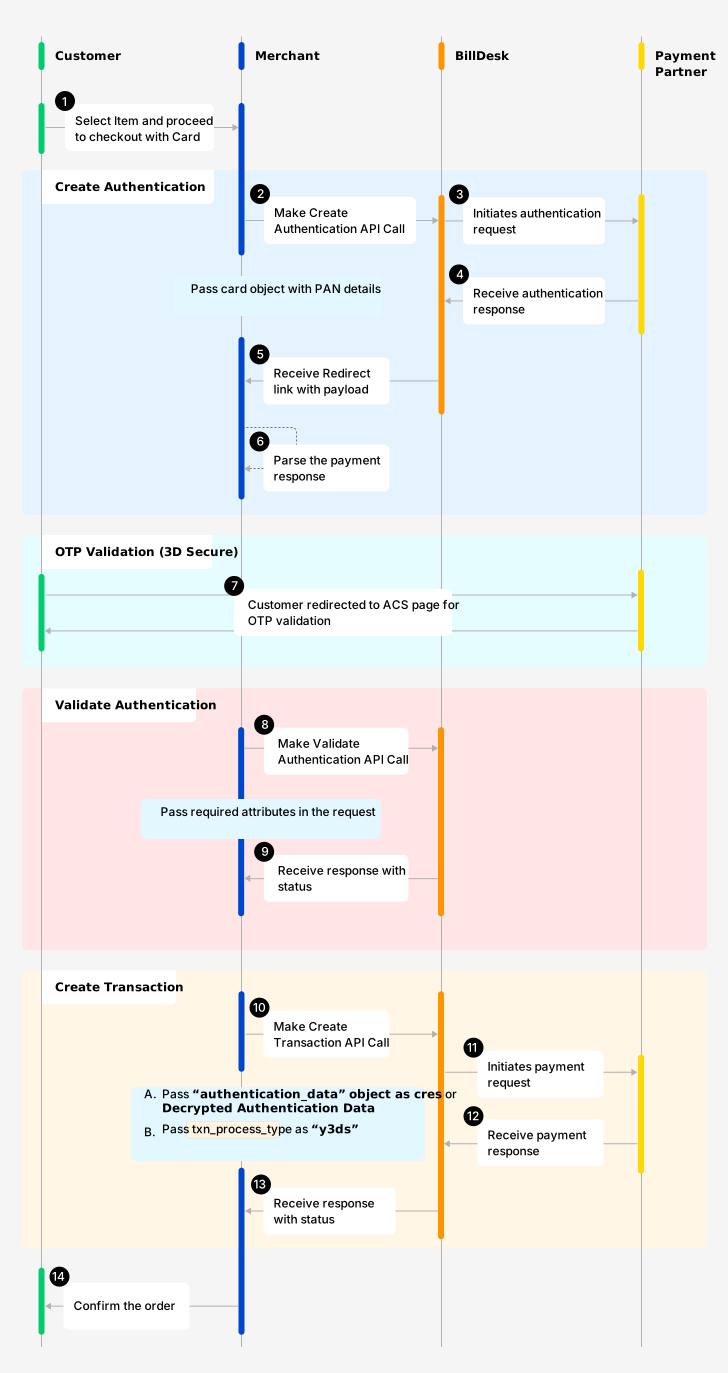
One Time Payment with PAN Data
To create an authentication, make use of Create Authentication API. Here are some of the attributes required to initiate create authentication request.
a. Request Body
| Attributes | Description |
|---|---|
| mercid | Unique identifier as defined by BillDesk for the merchant. |
| 3ds_parameter | Entity (merchant/BillDesk) that captures the device object attributes for 3DS2.0 authentication, expected values are: • |
| bankid | BillDesk defined unique identifier for the bank or acquirer |
| ru | Merchant return url, and required for specific payment methods – card, netbanking, wallet, cashcard. |
| itemcode | Value as provided by BillDesk, with a default value For EMI transactions, the value will be shared by the designated BillDesk RM based on issuer. E.g. |
| payment_method_type | Indicates the method of payment, and the values are: • card, The associated object will also be provided in the request. |
| txn_process_type | Indicates transaction processing type, will be the following values: • For card then value as |
| customer_refid | Unique customer identifier as per merchant, required for cardaccountid.
|
| card{} | Payment method object associated with card. |
| device{} | Device details object (Required for 3DS2.0 protocol). For more details on device object click here. |
b. Response Body
Response of the Create Transaction API will essentially inform the merchants to follow the next step that is required.
| Attribute | Description |
|---|---|
| authentication_status | Indicates the status of the request – with possible values as: • pending • success • failure |
| next_step | The attribute helps to determine next step at merchant end. It can take any single value as below: • 3ds2_challenge – for 3DS2.0, 3DSecure OTP flow needs to be completed as per below steps• capture_otp – for OTP led workflow (Only applicable in case of RuPay).• approve_collect_request – for UPI Collect.• approve_qr_request – for UPI QR.• approve_intent_request – for UPI Intent. |
| links | Associated links with the object. |
Call to action by the merchantFrom the response of Create Authentication API, merchant will receive the links array object:
- Pass the attributes & their corresponding values from the parameters object.
- Method attribute suggest 'GET/ POST', which the merchant should appropriately manage.
- Redirect the customer to the href URL basis the attributes/method mentioned above.
{
  //Sample code. Actual response will vary.
  "links": [
	{
		"href": "https://www.issueurl.com/page.jsp",
		"rel": "redirect",
		"method": "post",
		"parameters": {
      //BillDesk in response may send either "creq" or "bdcreq" as the attribute
			"creq": "eyJtZXNzYWdl2luZG93U2l6ZSI6IjA1In0="
		}
	}
],
"next_step":"3ds2_challenge"
}
NoteThe attributes and their values in parameters object are dynamic in nature. Please do not hard code these attributes/values at merchant's end.
3.1.3 Validate Authentication (Step 2)
Validate Authentication is the second step, to validate the authentication request sent by the merchant in Step 1. The step is essential for all card/token led transactions. Merchant should initiate validate authentication API post authentication (3D Secure - OTP validation) is successfully complete by the customer.
To validate an authentication, make use of Validate Transaction API. Here are some of the attributes required to initiate validate authentication request.
a. Request Body
| Attribute | Description |
|---|---|
| authenticationid | Unique authenticationid created by BillDesk. Received in 'Create Authentication' API response. |
| mercid | Unique identifier as defined by BillDesk for each merchant. |
| response_parameters{} | Response parameters from issuer (for redirect flows) or entered by the customer (for OTP flow) |
b. Response Body
Response of the Validate Authentication API will essentially inform the merchants to follow the next step that is required.
| Attribute | Description |
|---|---|
| authenticationid | Unique authenticationid created by BillDesk. Received in 'Create Authentication' API response. |
| mercid | Unique identifier as defined by BillDesk for each merchant. |
| authentication_status | Indicates the status of the request – with possible values as: • pending • success • failure |
| eci | Authentication ECI indicator, as per the 3DS2.0 protocol. Received for 3DS2.0 workflow. • ECI: 05/02
|
| cavv | CAVV value generated by issuer |
| ds_transaction_id | Directory server transaction id |
| threeds_version | Protocol of the 3DS2.0 version used for authentication |
3.1.4 Create Transaction (Step 3)
To authorize the payment transaction using PAN details, use the Create Transaction API. For one time transaction with PAN details, please refer to the below workflow.
To create a transaction use, Create Transaction API. Here are some of the attributes required to initiate create transaction request.
Additionally, merchant can also request to create a token against the card passed in the Create Transaction request. Here the merchant needs to pass two additional attributes within the card object (tokenize = true & coft_consent = true).
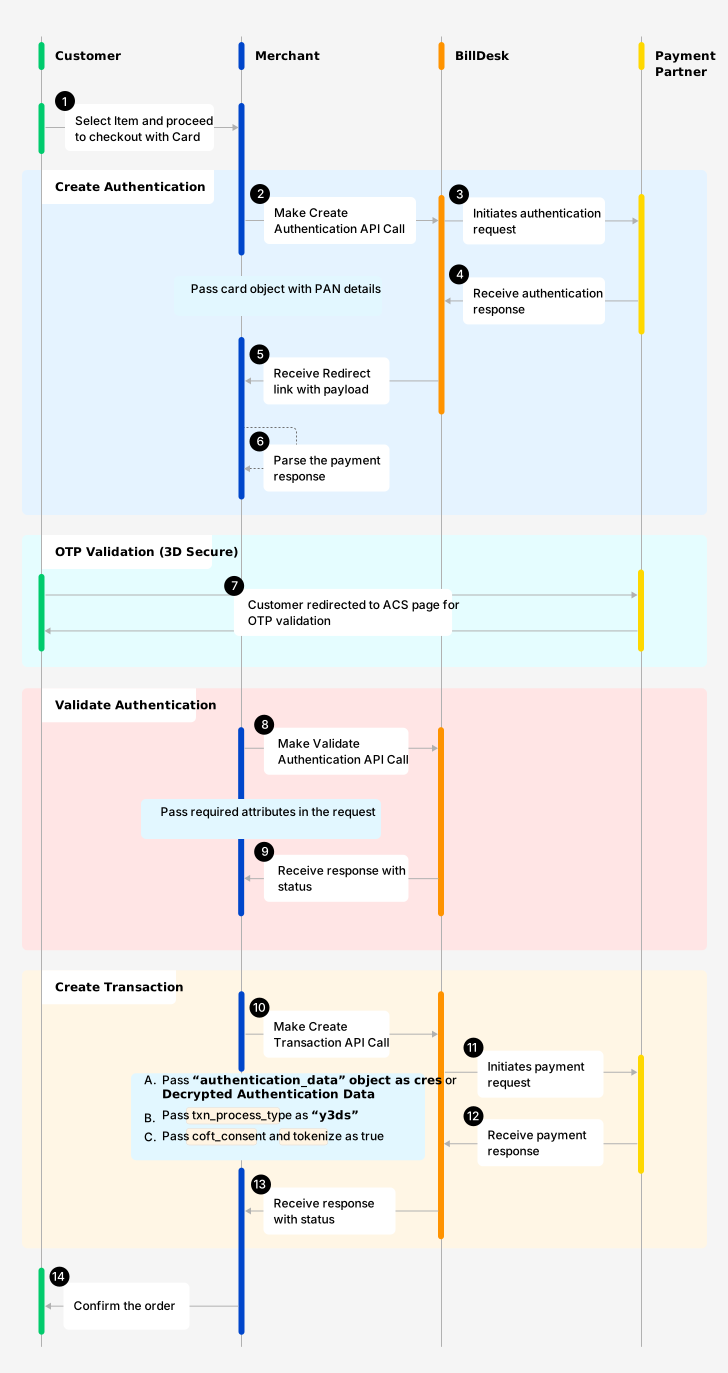
One Time Payment + Token Provision using PAN Data
a. Request Body
| Attributes | Description |
|---|---|
| mercid | Unique identifier as defined by BillDesk for the merchant. |
| bankid | BillDesk defined unique identifier for the bank or acquirer |
| ru | Merchant return url, and required for specific payment methods – card, netbanking, wallet, cashcard. |
| itemcode | Value as provided by BillDesk, with a default value For EMI transactions, the value will be shared by the designated BillDesk RM based on issuer. E.g. |
| payment_method_type | Indicates the method of payment, and the values are: • card, The associated object will also be provided in the request. |
| txn_process_type | Indicates transaction processing type, will be the following values: • For card then value as |
| customer_refid | Unique customer identifier as per merchant, required for cardaccountid.
|
| card{} | Payment method object associated with card. |
| device{} | Device details object (Required for 3DS2.0 protocol). For more details on device object click here. |
| authentication_data{} | Decrypted authentication data needs to be passed in authentication data object. E.g. eci, cavv, threeds_version & ds_transaction_id |
b. Response Body
Response of the Create Transaction API will essentially inform the merchants to follow the next step that is required.
| Attribute | Description |
|---|---|
| auth_status | Indicates the authorization status of the transaction with the following possible values: • 0300 - transaction is successful.• 0002 - transaction is pending for authorization.• 0399 - transaction failed. |
| eci | Authentication ECI indicator, as per the 3DS2.0 protocol. Received for 3DS2.0 workflow. • ECI: 05/02
|
| authcode | Authorization code, generally received from the acquirer for a successfully authorized card transaction |
| payment_category | • 00 for Card Gateway• 01 for NetBanking• 02 for Credit card• 03 for Debit card• 04 for Cash card• 05 for Mobile wallet• 10 for UPI• 11 for Bharat QR• 12 for Loan EMI• 13 for NEFT• 18 for UPI Credit• 19 for ENACH• 20 for CBDC• 21 for UPI Prepaid Wallet• 22 for UPI Credit Line |
Understanding the various Create Transaction Status codes:
| Status | Status Code | Description |
|---|---|---|
| SUCCESSFUL | 0300 | A transaction which has been initiated at BillDesk is marked as successful. |
| PENDING | 0002 | A transaction which has been initiated but is in pending status. |
| FAILED | 0399 | A transaction which has been initiated but is in failed state |
3.2 For Card (Token Based Transactions)
BillDesk provides a range of payment methods that cater to specific use cases, transaction amounts, and transaction process types. In this section, for payment_method_type as card the details of the workflow are defined as follows. These steps will help the merchant to understand how they can complete a payment journey.
3.2.1 Create Authentication (Step 1)
To initiate payment transaction using token details, use the Create Authentication API to initiate the authentication of the card holder. The steps explain how the cardholder can complete their authentication on merchant website/app.
NoteFor token based transactions, request to fetch Alt ID API is not required.
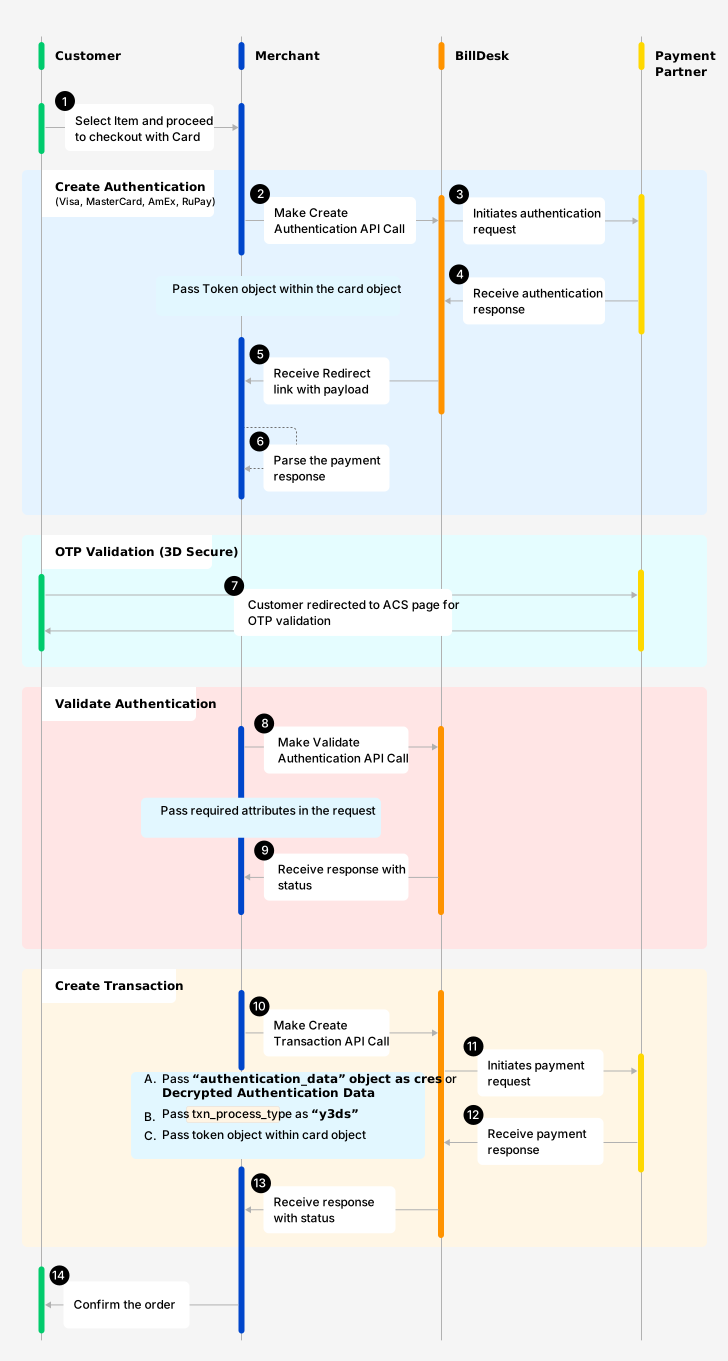
One Time Payment with Token Data
To create an authentication use, Create Authentication API. Here are some of the attributes required to initiate create authentication request.
a. Request Body
| Attributes | Description |
|---|---|
| mercid | Unique identifier as defined by BillDesk for the merchant. |
| 3ds_parameter | Entity (merchant/BillDesk) that captures the device object attributes for 3DS2.0 authentication, values are: • |
| bankid | BillDesk defined unique identifier for the bank or acquirer |
| ru | Merchant return url, and required for specific payment methods – card, netbanking, wallet, cashcard. |
| itemcode | Value as provided by BillDesk, with a default value For EMI transactions, the value will be shared by the designated BillDesk RM based on issuer. E.g. |
| payment_method_type | Indicates the method of payment, and the values are: • card, The associated object will also be provided in the request. |
| txn_process_type | Indicates transaction processing type, will be the following values: • For card then value as |
| customer_refid | Unique customer identifier as per merchant, required for cardaccountid.
|
| card{} | Payment method object associated with token. |
| device{} | Device details object (Required for 3DS2.0 protocol). For more details on device object click here. |
b. Response Body
Response of the Create Transaction API will essentially inform the merchants to follow the next step that is required.
| Attribute | Description |
|---|---|
| authentication_status | Indicates the status of the request – with possible values as: • pending • success • failure |
| next_step | The attribute helps to determine next step at merchant end. It can take any single value as below: • 3ds2_challenge – for 3DS2.0, 3DSecure OTP flow needs to be completed as per below steps• capture_otp – for OTP led workflow (Only applicable in case of RuPay).• approve_collect_request – for UPI Collect.• approve_qr_request – for UPI QR.• approve_intent_request – for UPI Intent. |
| links | Associated links with the object. |
Please refer to 3.1.1 (b) section for response parameters.
3.2.2 Validate Authentication (Step 2)
Validate Authentication is the second step, to validate the authentication request sent by the merchant in Step 1. The step is essential for all card/token led transactions. Merchant should initiate validate authentication API post authentication (3D Secure - OTP validation) is complete by the customer.
To validate a authentication use, Validate Transaction API. Here are some of the attributes required to initiate validate authentication request.
a. Request Body
| Attribute | Description |
|---|---|
| authenticationid | Unique authenticationid created by BillDesk. Received in 'Create Authentication' API response. |
| mercid | Unique identifier as defined by BillDesk for each merchant. |
| response_parameters{} | Response parameters from issuer (for redirect flows) or entered by the customer (for OTP flow) |
b. Response Body
Response of the Validate Authentication API will essentially inform the merchants to follow the next step that is required.
| Attribute | Description |
|---|---|
| authenticationid | Unique authenticationid created by BillDesk. Received in 'Create Authentication' API response. |
| mercid | Unique identifier as defined by BillDesk for each merchant. |
| authentication_status | Indicates the status of the request – with possible values as: • pending • success • failure |
| eci | Authentication ECI indicator, as per the 3DS2.0 protocol. Received for 3DS2.0 workflow. • ECI: 05/02
|
| cavv | CAVV value generated by issuer |
| ds_transaction_id | Directory server transaction id |
| threeds_version | Protocol of the 3DS2.0 version used for authentication |
3.2.3 Create Transaction (Step 3)
To authorize the payment transaction using token details within card object, use the Create Transaction API. For one time transaction with PAN details, please refer to the below workflow.
Some of the attributes required to initiate create transaction request.
a. Request Body
| Attributes | Description |
|---|---|
| mercid | Unique identifier as defined by BillDesk for the merchant. |
| bankid | BillDesk defined unique identifier for the bank or acquirer |
| ru | Merchant return url, and required for specific payment methods – card, netbanking, wallet, cashcard. |
| itemcode | Value as provided by BillDesk, with a default value For EMI transactions, the value will be shared by the designated BillDesk RM based on issuer. E.g. |
| payment_method_type | Indicates the method of payment, and the values are: • card, The associated object will also be provided in the request. |
| txn_process_type | Indicates transaction processing type, will be the following values: • For card then value as |
| customer_refid | Unique customer identifier as per merchant, required for cardaccountid.
|
| card{} | Payment method object associated with token. |
| device{} | Device details object (Required for 3DS2.0 protocol). For more details on device object click here. |
| authentication_data{} | Decrypted authentication data needs to be passed in authentication data object. E.g. eci, cavv, threeds_version & ds_transaction_id |
b. Response Body
Response of the Create Transaction API will essentially inform the merchants to follow the next step that is required.
| Attribute | Description |
|---|---|
| auth_status | Indicates the authorization status of the transaction with the following possible values: • 0300 - transaction is successful.• 0002 - transaction is pending for authorization.• 0399 - transaction failed. |
| eci | eci value for the authentication taken for the card transaction |
| authcode | Authorization code, generally received from the acquirer for a successfully authorized card transaction |
| payment_category | • 00 for Card Gateway• 01 for NetBanking• 02 for Credit card• 03 for Debit card• 04 for Cash card• 05 for Mobile wallet• 10 for UPI• 11 for Bharat QR• 12 for Loan EMI• 13 for NEFT• 18 for UPI Credit• 19 for ENACH• 20 for CBDC• 21 for UPI Prepaid Wallet• 22 for UPI Credit Line |
Understanding the various Create Transaction Status codes:
| Status | Status Code | Description |
|---|---|---|
| SUCCESSFUL | 0300 | A transaction which has been initiated at BillDesk is marked as successful. |
| PENDING | 0002 | A transaction which has been initiated but is in pending status. |
| FAILED | 0399 | A transaction which has been initiated but is in failed state |
3.3 For CardAccountId - Approach 'A'
BillDesk provides a range of payment methods that cater to specific use cases, transaction amounts, and transaction process types. In this section, for payment_method_type as card the details of the workflow are defined as follows. These steps will help the merchant to understand how they can complete a payment journey.
NoteFor cardaccountid based transactions, Diners need additional attributes such as cvv and card_end in the Create Authentication & Create Transaction API request in the card object
3.3.1 Create Authentication (Step 1)
To initiate payment transaction using cardaccountid details, use the Create Authentication API to initiate the authentication of the card holder. The steps explain how the cardholder can complete their authentication on merchant website/ app.
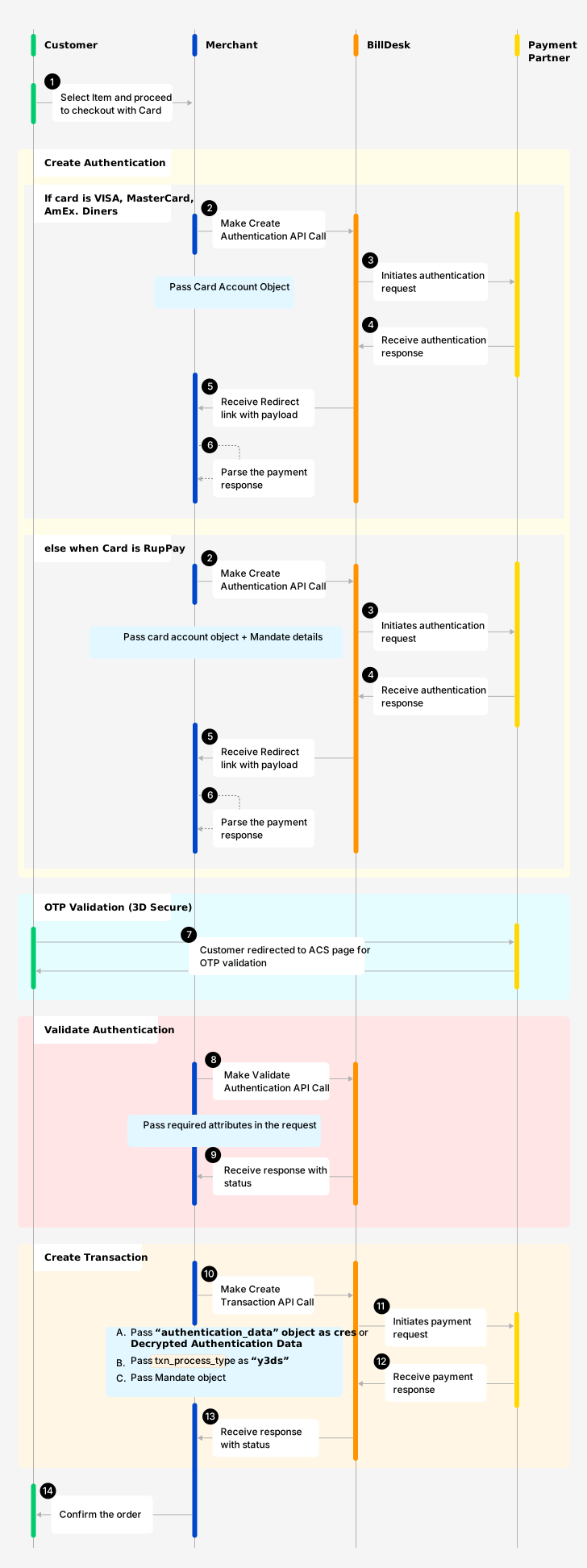
One Time Payment with Token Data
To create an authentication use, Create Authentication API. Here are some of the attributes required to initiate create authentication request.
a. Request Body
| Attributes | Description |
|---|---|
| mercid | Unique identifier as defined by BillDesk for the merchant. |
| 3ds_parameter | Entity (merchant/BillDesk) that captures the device object attributes for 3DS2.0 authentication, values are: • |
| bankid | BillDesk defined unique identifier for the bank or acquirer |
| ru | Merchant return url, and required for specific payment methods – card, netbanking, wallet, cashcard. |
| itemcode | Value as provided by BillDesk, with a default value For EMI transactions, the value will be shared by the designated BillDesk RM based on issuer. E.g. |
| payment_method_type | Indicates the method of payment, and the values are: • card, The associated object will also be provided in the request. |
| txn_process_type | Indicates transaction processing type, will be the following values: • For card then value as |
| customer_refid | Unique customer identifier as per merchant, required for cardaccountid.
|
| card{} | Payment method object associated with token. |
| device{} | Device details object (Required for 3DS2.0 protocol). For more details on device object click here. |
b. Response Body
Response of the Create Transaction API will essentially inform the merchants to follow the next step that is required.
| Attribute | Description |
|---|---|
| authentication_status | Indicates the status of the request – with possible values as: • pending • success • failure |
| next_step | The attribute helps to determine next step at merchant end. It can take any single value as below: • 3ds2_challenge – for 3DS2.0, 3DSecure OTP flow needs to be completed as per below steps• capture_otp – for OTP led workflow (Only applicable in case of RuPay).• approve_collect_request – for UPI Collect.• approve_qr_request – for UPI QR.• approve_intent_request – for UPI Intent. |
| links | Associated links with the object. |
Please refer to 3.1.1 (b) section for response parameters.
3.3.2 Validate Authentication (Step 2)
Validate Authentication is the second step, to validate the authentication request sent by the merchant in Step 1. The step is essential for all card/ token led transactions. Merchant should initiate validate authentication API post authentication (3D Secure - OTP validation) is complete by the customer.
To validate a authentication use, Validate Transaction API. Here are some of the attributes required to initiate validate authentication request.
a. Request Body
| Attribute | Description |
|---|---|
| authenticationid | Unique authenticationid created by BillDesk. Received in 'Create Authentication' API response. |
| mercid | Unique identifier as defined by BillDesk for each merchant. |
| response_parameters{} | Response parameters from issuer (for redirect flows) or entered by the customer (for OTP flow) |
b. Response Body
Response of the Validate Authentication API will essentially inform the merchants to follow the next step that is required.
| Attribute | Description |
|---|---|
| authenticationid | Unique authenticationid created by BillDesk. Received in 'Create Authentication' API response. |
| mercid | Unique identifier as defined by BillDesk for each merchant. |
| authentication_status | Indicates the status of the request – with possible values as: • pending • success • failure |
| eci | Authentication ECI indicator, as per the 3DS2.0 protocol. Received for 3DS2.0 workflow. • ECI: 05/02
|
| cavv | CAVV value generated by issuer |
| ds_transaction_id | Directory server transaction id |
| threeds_version | Protocol of the 3DS2.0 version used for authentication |
3.3.3 Create Transaction (Step 3)
To authorize the payment transaction using token details within card object, use the Create Transaction API. For one time transaction with PAN details, please refer to the below workflow.
To create a transaction, make use of Create Transaction API. Here are some of the attributes required to initiate create transaction request.
a. Request Body
| Attributes | Description |
|---|---|
| mercid | Unique identifier as defined by BillDesk for the merchant. |
| bankid | BillDesk defined unique identifier for the bank or acquirer |
| ru | Merchant return url, and required for specific payment methods – card, netbanking, wallet, cashcard. |
| itemcode | Value as provided by BillDesk, with a default value For EMI transactions, the value will be shared by the designated BillDesk RM based on issuer. E.g. |
| payment_method_type | Indicates the method of payment, and the values are: • card, The associated object will also be provided in the request. |
| txn_process_type | Indicates transaction processing type, will be the following values: • For card then value as |
| customer_refid | Unique customer identifier as per merchant, required for cardaccountid.
|
| card{} | Payment method object associated with token. |
| device{} | Device details object (Required for 3DS2.0 protocol). For more details on device object click here. |
| authentication_data{} | Decrypted authentication data needs to be passed in authentication data object. E.g. eci, cavv, threeds_version & ds_transaction_id |
b. Response Body
Response of the Create Transaction API will essentially inform the merchants to follow the next step that is required..
| Attribute | Description |
|---|---|
| auth_status | Indicates the authorization status of the transaction with the following possible values: • 0300 - transaction is successful.• 0002 - transaction is pending for authorization.• 0399 - transaction failed. |
| eci | Authentication ECI indicator, as per the 3DS2.0 protocol. Received for 3DS2.0 workflow. • ECI: 05/02
|
| authcode | Authorization code, generally received from the acquirer for a successfully authorized card transaction |
| payment_category | • 00 for Card Gateway• 01 for NetBanking• 02 for Credit card• 03 for Debit card• 04 for Cash card• 05 for Mobile wallet• 10 for UPI• 11 for Bharat QR• 12 for Loan EMI• 13 for NEFT• 18 for UPI Credit• 19 for ENACH• 20 for CBDC• 21 for UPI Prepaid Wallet• 22 for UPI Credit Line |
Understanding the various Create Transaction Status codes:
| Status | Status Code | Description |
|---|---|---|
| SUCCESSFUL | 0300 | A transaction which has been initiated at BillDesk is marked as successful. |
| PENDING | 0002 | A transaction which has been initiated but is in pending status. |
| FAILED | 0399 | A transaction which has been initiated but is in failed state |
3.4 For CardAccountId - Approach 'B'
BillDesk provides a range of payment methods that cater to specific use cases, transaction amounts, and transaction process types. In this section, for payment_method_type as card the details of the workflow are defined as follows. These steps will help the merchant to understand how they can complete a payment journey.
3.4.1 Create Authentication (Step 1)
To initiate payment transaction using cardaccountid details, use the Create Authentication API to initiate the authentication of the card holder. The steps explain how the cardholder can complete their authentication on merchant website/app.
One Time Payment with Token Data
To create an authentication use, Create Authentication API. Here are some of the attributes required to initiate create authentication request.
a. Request Body
| Attributes | Description |
|---|---|
| mercid | Unique identifier as defined by BillDesk for the merchant. |
| 3ds_parameter | Entity (merchant/BillDesk) that captures the device object attributes for 3DS2.0 authentication, values are: • |
| bankid | BillDesk defined unique identifier for the bank or acquirer |
| ru | Merchant return url, and required for specific payment methods – card, netbanking, wallet, cashcard. |
| itemcode | Value as provided by BillDesk, with a default value For EMI transactions, the value will be shared by the designated BillDesk RM based on issuer. E.g. |
| payment_method_type | Indicates the method of payment, and the values are: • card, The associated object will also be provided in the request. |
| txn_process_type | Indicates transaction processing type, will be the following values: • For card then value as |
| customer_refid | Unique customer identifier as per merchant, required for cardaccountid.
|
| card{} | Payment method object associated with token. |
| device{} | Device details object (Required for 3DS2.0 protocol). For more details on device object click here. |
b. Response Body
Response of the Create Transaction API will essentially inform the merchants to follow the next step that is required.
| Attribute | Description |
|---|---|
| authentication_status | Indicates the status of the request – with possible values as: • pending • success • failure |
| next_step | The attribute helps to determine next step at merchant end. It can take any single value as below: • 3ds2_challenge – for 3DS2.0, 3DSecure OTP flow needs to be completed as per below steps• capture_otp – for OTP led workflow (Only applicable in case of RuPay).• approve_collect_request – for UPI Collect.• approve_qr_request – for UPI QR.• approve_intent_request – for UPI Intent. |
| links | Associated links with the object. |
Please refer to 3.1.1 (b) section for response parameters.
3.4.2 Validate Authentication (Step 2)
Validate Authentication is the second step, to validate the authentication request sent by the merchant in Step 1. The step is essential for all card/ token led transactions. Merchant should initiate validate authentication API post authentication (3D Secure - OTP validation) is complete by the customer.
To validate a authentication use, Validate Transaction API. Here are some of the attributes required to initiate validate authentication request.
a. Request Body
| Attribute | Description |
|---|---|
| authenticationid | Unique authenticationid created by BillDesk. Received in 'Create Authentication' API response. |
| mercid | Unique identifier as defined by BillDesk for each merchant. |
| response_parameters{} | Response parameters from issuer (for redirect flows) or entered by the customer (for OTP flow) |
b. Response Body
Response of the Validate Authentication API will essentially inform the merchants to follow the next step that is required.
| Attribute | Description |
|---|---|
| authenticationid | Unique authenticationid created by BillDesk. Received in 'Create Authentication' API response. |
| mercid | Unique identifier as defined by BillDesk for each merchant. |
| authentication_status | Indicates the status of the request – with possible values as: • pending • success • failure |
| eci | Authentication ECI indicator, as per the 3DS2.0 protocol. Received for 3DS2.0 workflow. • ECI: 05/02
|
| cavv | CAVV value generated by issuer |
| ds_transaction_id | Directory server transaction id |
| threeds_version | Protocol of the 3DS2.0 version used for authentication |
3.4.3 Create Transaction (Step 3)
To authorize the payment transaction using token details within card object, use the Create Transaction API. For one time transaction with PAN details, please refer to the below workflow.
To create a transaction, make use of Create Transaction API. Here are some of the attributes required to initiate create transaction request.
a. Request Body
| Attributes | Description |
|---|---|
| mercid | Unique identifier as defined by BillDesk for the merchant. |
| bankid | BillDesk defined unique identifier for the bank or acquirer |
| ru | Merchant return url, and required for specific payment methods – card, netbanking, wallet, cashcard. |
| itemcode | Value as provided by BillDesk, with a default value For EMI transactions, the value will be shared by the designated BillDesk RM based on issuer. E.g. |
| payment_method_type | Indicates the method of payment, and the values are: • card, The associated object will also be provided in the request. |
| txn_process_type | Indicates transaction processing type, will be the following values: • For card then value as |
| customer_refid | Unique customer identifier as per merchant, required for cardaccountid.
|
| card{} | Payment method object associated with token. |
| device{} | Device details object (Required for 3DS2.0 protocol). For more details on device object click here. |
| authentication_data{} | Decrypted authentication data needs to be passed in authentication data object. E.g. eci, cavv, threeds_version & ds_transaction_id |
b. Response Body
Response of the Create Transaction API will essentially inform the merchants to follow the next step that is required.
| Attribute | Description |
|---|---|
| auth_status | Indicates the authorization status of the transaction with the following possible values: • 0300 - transaction is successful.• 0002 - transaction is pending for authorization.• 0399 - transaction failed. |
| eci | Authentication ECI indicator, as per the 3DS2.0 protocol. Received for 3DS2.0 workflow. • ECI: 05/02
|
| authcode | Authorization code, generally received from the acquirer for a successfully authorized card transaction |
| payment_category | • 00 for Card Gateway• 01 for NetBanking• 02 for Credit card• 03 for Debit card• 04 for Cash card• 05 for Mobile wallet• 10 for UPI• 11 for Bharat QR• 12 for Loan EMI• 13 for NEFT• 18 for UPI Credit• 19 for ENACH• 20 for CBDC• 21 for UPI Prepaid Wallet• 22 for UPI Credit Line |
Understanding the various Create Transaction Status codes:
| Status | Status Code | Description |
|---|---|---|
| SUCCESSFUL | 0300 | A transaction which has been initiated at BillDesk is marked as successful. |
| PENDING | 0002 | A transaction which has been initiated but is in pending status. |
| FAILED | 0399 | A transaction which has been initiated but is in failed state |
Updated 11 months ago